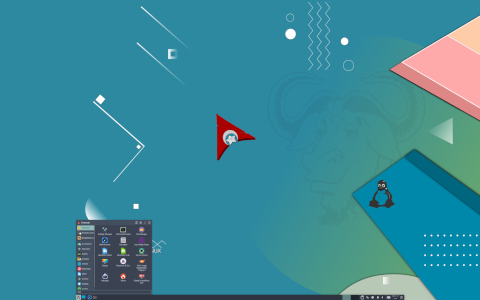
What Is Archman GNU/Linux?
Archman GNU/Linux is a modern, lightweight, and highly customizable Linux distribution based on the iconic Arch Linux. Designed and maintained by the Turkish developer community, Archman offers users a smooth rolling-release experience, combining the power and flexibility of Arch Linux with user-friendly tools and preconfigured desktop environments. It emphasizes speed, simplicity, and minimalism, making it an attractive choice for both seasoned Linux enthusiasts and newcomers willing to dive deeper into the Arch ecosystem.
History and Development
Origins
Archman was first released in 2016 by a team led by Erman Adeeb. The goal was to provide a ready-to-use, Arch-based system with minimal setup, allowing users to experience Arch Linux without the complexity of manual installation. Drawing inspiration from ArchBang and other minimalist Arch derivatives, Archman quickly gained popularity in Turkey and among global users seeking an Arch-based distribution with a graphical installer.
Key Milestones
- 2016: Initial release with Xfce desktop and Calamares installer.
- 2017: Introduction of multiple desktop editions including KDE Plasma and MATE.
- 2018: Implementation of custom Archman tools and themes to enhance usability.
- 2020: Improved system installer, updated core packages, and adoption of the latest Linux kernel versions.
- 2022: New ISO images with Wayland sessions and support for ARM architectures.
How It Works
Archman employs a rolling-release model, meaning that once installed, the system receives continuous updates without the need for complete reinstallation. This model ensures access to the latest software versions, security patches, and kernel upgrades as soon as they become available in the Arch repositories.
Core Components
- Linux Kernel: The latest stable kernel optimizes hardware support and performance.
- Pacman: Arch’s native package manager, handling software installation, upgrades, and dependency resolution.
- Systemd: Init system and service manager ensuring fast boot times and robust service control.
- Calamares: A graphical installer simplifying disk partitioning, user creation, and bootloader configuration.
- Custom Scripts: Archman-specific utilities streamline initial setup and theming tasks.
System Architecture
- x86_64: Standard 64-bit architecture supported by default.
- ARM (experimental): Community-driven support for single-board computers and embedded devices.
- UEFI Legacy BIOS: Both boot methods are supported, with secure boot options.
Key Features
User-Friendly Installer
Archman’s adoption of the Calamares installer brings a step-by-step installation process with options for:
- Automated or manual partitioning.
- Bootloader selection (GRUB by default).
- Timezone, locale, and keyboard layout configuration.
- User account creation with optional root password.
Preconfigured Desktops
While Arch Linux demands manual installation of desktop environments, Archman ships with polished editions:
- Xfce Edition: Lightweight, stable, and ideal for older hardware.
- KDE Plasma Edition: Feature-rich, visually appealing, and highly customizable.
- MATE Edition: Traditional desktop layout with modest resource usage.
- Openbox Edition: Ultra-minimal, window-manager-only setup for power users.
Theming and Customization
Archman includes a suite of themes, icons, and wallpapers designed to provide a cohesive look across all desktops:
- ArcMan Theme: A custom light/dark theme combination inspired by modern design trends.
- ArcMan Icons: Custom icon pack ensuring visual consistency.
- Conky Widgets: Preconfigured system monitors for the desktop.
Package Management with Pacman
Archman relies on Pacman, Arch Linux’s official package manager. Pacman uses simple tar archives with a straightforward dependency resolution system.
Common Pacman Commands
- Update package database: pacman -Sy
- Full system upgrade: pacman -Syu
- Install a package: pacman -S ltpackage_namegt
- Remove a package: pacman -R ltpackage_namegt
- Search for packages: pacman -Ss ltsearch_termgt
- Clean cache: pacman -Sc / pacman -Scc
AUR (Arch User Repository)
One of Archman’s strengths is seamless AUR integration. While Pacman manages official repositories, the AUR provides community-maintained packages. Tools like yay or paru can be installed to automate AUR package building and installation.
Target Audience and Use Cases
Archman appeals to a diverse set of users:
Advanced Enthusiasts
- Those who appreciate the transparency and control of Arch Linux.
- Users seeking a stable rolling-release environment without manual installation complexity.
- Developers and sysadmins requiring the latest software versions.
Intermediate Users
- Individuals ready to move beyond Ubuntu or Debian but hesitant about a full Arch installation.
- Students and hobbyists learning Linux system administration.
Specialized Use Cases
- Multimedia Production: Access to up-to-date audio and video tools.
- Programming and Development: Bleeding-edge libraries and compilers.
- Gaming: Native and Proton-based gaming on Linux with the latest drivers.
- Embedded Systems: Lightweight editions for ARM-based SBCs.
Installation and Configuration
System Requirements
| Component | Minimum | Recommended |
|---|---|---|
| CPU | 1 GHz | Dual-core 2 GHz |
| RAM | 512 MB | 2 GB |
| Storage | 5 GB | 20 GB |
| GPU | VGA-capable | OpenGL 3.0 |
Installation Steps
- Download the desired ISO image from the official site.
- Create a live USB using tools like dd or BalenaEtcher.
- Boot from the USB and launch the Calamares installer.
- Partition disks (automatic or manual).
- Select time zone, locale, and keyboard layout.
- Create user and set root password.
- Install and reboot into the new system.
Post-Installation Tips
- Run sudo pacman -Syu to fetch the latest updates.
- Install AUR helper (yay) for community packages.
- Configure backup tools and snapshots (e.g., Timeshift).
- Enable essential services with systemctl (e.g., NetworkManager).
Desktop Environments and Window Managers
Archman’s multiple editions cater to different preferences:
Xfce Edition
- Resource-efficient, ideal for older or modest hardware.
- Integrated panel, file manager (Thunar), and session manager.
KDE Plasma Edition
- Highly configurable, animated widgets, and Kwin effects.
- Optimized for modern desktops with high-resolution screens.
MATE Edition
- Classic GNOME 2 experience with low resource footprint.
- Stable and reliable for everyday use.
Openbox Edition
- Minimalist, window-manager-only design.
- Complete control for users who prefer manual configuration.
Community and Support
Archman’s development thrives on community contributions:
- Forum: Active discussions, troubleshooting, and feature requests.
- Wiki: Detailed documentation on installation, customization, and troubleshooting.
- Bug Tracker: Users can report issues on GitLab or the official site.
- Social Media: Updates on Twitter, Telegram, and local Turkish Linux communities.
Curiosities and Fun Facts
- Name Origin: “Archman” blends “Arch” with “man,” referencing the Arch and the creator’s surname, Adeeb Man.
- Localization: Strong Turkish-language support, including custom Turkish locale packages.
- Live Session Persistence: Some editions support persistent live USB sessions out of the box.
- MinimalISO: A tiny 200 MB ISO to bootstrap minimal Archman installations.
- Custom Artwork: Community-driven desktop wallpapers often rotate monthly.
- Performance Tweaks: Pre-tuned sysctl settings for improved networking and disk I/O.
Comparison Table: Archman vs. Arch vs. ArchBang
| Feature | Arch Linux | ArchBang | Archman |
|---|---|---|---|
| Installer | Manual CLI | cb4 (CLI) | Calamares (GUI) |
| Default DE | None | Openbox | Xfce, KDE, MATE, Openbox |
| Theming | User-defined | Basic | Rich custom themes |
| AUR Support | Manual | Manual | Easy with helper tools |
| Community Language | English | English | Turkish English |
Conclusion
Archman GNU/Linux offers a compelling blend of Arch Linux’s versatility with user-friendly enhancements. Its rolling-release model ensures that users always have the newest software, while the Calamares installer and preconfigured desktop environments drastically reduce setup time. With robust community support, custom theming, and a commitment to performance, Archman stands out as a top choice for anyone looking to harness the power of Arch Linux without jumping through hoops.
Sources for further reading:
Leave a Reply