Introduction
FreedomBox is an innovative, privacy-respecting computing platform designed to reclaim personal data control and digital autonomy. By empowering individuals, families, small communities and organizations, it transforms an ordinary small computer into a secure, private home server. Below is an extensive overview of what FreedomBox is, how it works, its target audience, and several curiosities that highlight its unique characteristics.
What Is FreedomBox?
FreedomBox is a free and open-source software suite and hardware design intended to provide easy-to-use, privacy-enhancing services at home or in small offices. It is based on Debian GNU/Linux, benefiting from a large and respected open-source community. FreedomBox can be installed on a variety of inexpensive devices, including single-board computers, mini PCs, or repurposed older hardware.
Core Objectives
- Privacy by Design: All services are configured with strong encryption and privacy defaults.
- Decentralization: Avoids centralized corporate servers users host services locally or on trusted servers.
- Ease of Use: Simple web interface for installation and configuration, without requiring deep technical skills.
- Security: Automatic updates and hardened settings reduce attack surface.
- Freedom: Upholds software freedom principles by using only free and open-source components.
Historical Background
- Origin: Started in 2013 as a grassroots project under the FreedomBox Foundation.
- Debian Sponsorship: Became an official Debian derivative, leveraging Debian’s package management and security mechanisms.
- Community Growth: Attracted developers, privacy activists, and ethical hackers motivated by digital sovereignty.
How FreedomBox Works
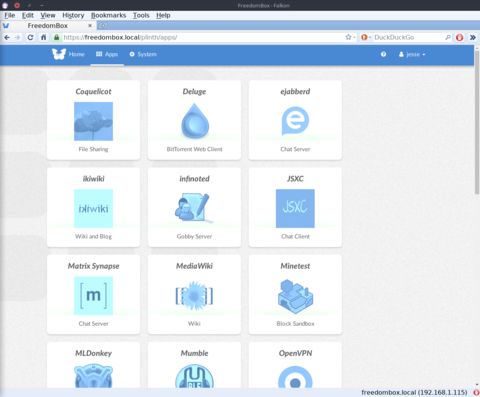
FreedomBox combines hardware and software to deliver server-like functionality within a home environment, all manageable through a browser-based dashboard. Its design focuses on modularity, security, and user-friendly automation.
Software Architecture
- Debian Base: Uses the Debian stable branch for reliability and well-tested software packages.
- Service Management: Utilizes systemd and integrated scripts for streamlined service installation, upgrades, and removal.
- Docker and Sandboxing: Some optional services run in containers to isolate dependencies and reduce conflicts.
- Web Interface: A consolidated dashboard provides intuitive controls for administration, monitoring, and logs.
Hardware Compatibility
- Single-Board Computers: Raspberry Pi, Pine64, Olimex, and other ARM-based boards.
- Mini PCs and x86 SoCs: Intel NUC, old laptops, and repurposed desktops.
- Self-Hosted Appliances: Commercially available FreedomBox appliances pre-configured by vendors.
- Resource Requirements:
- At least 1 GB of RAM (2 GB recommended)
- 8 GB or larger SD card / eMMC / SSD
- Ethernet connection for reliability (Wi-Fi supported)
Service Selection
FreedomBox offers a variety of plug-and-play applications. The following table summarizes some of the most common:
| Service | Description | Typical Use Case |
|---|---|---|
| Nextcloud | Self-hosted file sync and sharing platform with collaborative editing. | Families and small offices needing document collaboration and backups. |
| Matrix Synapse | Encrypted chat server implementing the Matrix protocol. | Privacy-focused messaging within communities or teams. |
| WireGuard | Modern, high-performance VPN to secure remote connections. | Accessing home network resources from public networks. |
| Tor Relay/Bridge | Participates in the Tor network to enhance anonymity and censorship resistance. | Supporting global privacy and free-flow of information. |
| Gitea | Self-hosted Git repository management service. | Developers hosting code privately or within small teams. |
Security and Updates
- Automatic Security Updates: Critical patches for Debian and FreedomBox components are applied automatically unless disabled.
- Firewall Rules: Preconfigured ufw or iptables settings restrict incoming connections to only necessary ports.
- Encrypted Backups: Users can schedule encrypted backups to external storage or cloud targets.
- Audit and Logging: Centralized logs with easy export, facilitating forensic analysis if needed.
Target Audience and Use Cases
FreedomBox is oriented toward anyone concerned with privacy, data ownership, and decentralization. Below are typical audiences and scenarios where FreedomBox excels.
Individuals and Families
- Photo and File Sharing: Avoids uploading personal photos to corporate clouds.
- Secure Messaging: Hosts private chat rooms for family members.
- Media Streaming: Local streaming of music and videos via services like Jellyfin.
Small Teams and Startups
- Code Hosting: Built-in Gitea or GitLab Lite for private repositories.
- Collaboration Tools: Nextcloud with OnlyOffice for document editing, calendars, and tasks.
- VPN Access: WireGuard to secure remote work connections.
Schools and Community Centers
- Education Portals: Host Moodle or Nextcloud Classroom for offline-first lesson plans.
- Local Social Networks: Matrix for classroom discussions without third-party surveillance.
- Offline Documentation: Local mirror of Wikipedia or other educational resources.
Privacy Activists and NGOs
- Tor Bridges: Running bridges to bypass censorship and strengthen the Tor network.
- Secure Drop Boxes: Accepting anonymous tips or documents via encrypted channels.
- Secure Wiki: Collaborative wikis with access controls for sensitive projects.
Curiosities and Unique Features
1. Name Origin
FreedomBox blends the idea of “freedom” in software and civil liberties with “box,” representing a compact, self-contained device. It echoes the concept of a “black box” but inverted: open, transparent, and user-controlled.
2. Debian Derivative or Spin?
Although often referred to as a Debian derivative, FreedomBox is technically a set of Debian packages and meta-packages. This approach ensures seamless integration with Debian repositories and tools, avoiding the pitfalls of a fully forked distribution.
3. Offline First Design
Many services can operate without internet connectivity, supporting local-only networks. This is particularly useful in harsh environments, disaster zones, or remote communities with intermittent internet.
4. Turnkey Appliances
Vendors like Olimex and Mythic Beasts offer pre-flashed hardware with FreedomBox installed, reducing setup time for non-technical users. These turnkey devices often include:
- Integrated power and network management
- Optimized cooling and performance for continuous operation
- One-click update mechanisms via custom firmware menus
5. Integration with Community Mesh Networks
FreedomBox can act as a gateway or node in community mesh networks. Combined with projects like LibreMesh or cjdns, it helps create resilient, decentralized internet alternatives in areas with limited connectivity.
6. Privacy Awards and Recognition
- Free Software Foundation’s Award for Projects of Social Benefit nomination in 2018.
- Featured talks at international conferences such as FOSDEM and DebConf.
- Adopted by digital self-defense workshops in universities and hacklabs globally.
Comparison with Alternative Solutions
| Feature | FreedomBox | Generic Home NAS | Cloud Services (e.g., Google Drive) |
|---|---|---|---|
| Privacy | High (local hosting, encryption by default) | Medium (local but may phone home) | Low (data on third-party servers) |
| Cost | Low (one-time hardware cost, free software) | Medium (device proprietary licenses) | Variable (subscription fees) |
| Maintenance | Semi-automatic updates | Manual firmware updates | Automatic (vendor-managed) |
| Customization | High (open-source, Debian packages) | Medium (limited to vendor apps) | Low (closed APIs) |
| Decentralization | Yes (peer-to-peer, self-hosting) | No (device-centric) | No (centralized cloud) |
Getting Started
- Choose hardware: Raspberry Pi or pre-configured appliance.
- Download the FreedomBox image from the official site: https://freedombox.org/download.
- Flash the image to an SD card or SSD using tools like balenaEtcher.
- Boot the device, connect it to your network, and navigate to its web interface (usually http://freedombox.local).
- Follow the setup wizard to configure your admin user, network settings, and core services.
- Install additional applications as needed via the dashboard’s Applications tab.
Conclusion
FreedomBox represents a significant step toward reclaiming digital sovereignty. By providing a user-friendly, secure, and private home server solution, it empowers individuals and communities to take control of their data, communications, and online lives. Whether used by a tech-savvy privacy enthusiast or a family seeking a safer digital environment, FreedomBox’s modular architecture and commitment to open-source principles make it a compelling alternative to centralized services and proprietary devices.
Sources and Further Reading
- FreedomBox Official Website: https://freedombox.org/
- Debian Project: https://www.debian.org/
- Nextcloud: https://nextcloud.com/
- Matrix.org: https://matrix.org/
Leave a Reply