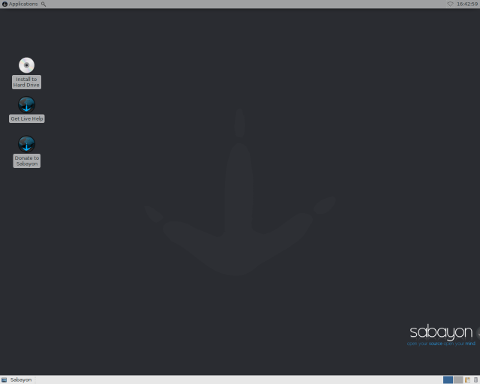
Introduction
Sabayon (formerly Sabayon Linux, before that RR4 Linux and RR64 Linux) is a versatile and user-friendly Linux distribution based on Gentoo. It aims to deliver a powerful, yet easy-to-use operating system that combines the flexibility of rolling releases with the convenience of precompiled packages. Sabayon stands out by providing multiple desktop environments, robust multimedia support, and a comprehensive package management system. Its design philosophy centers on accessibility for newcomers and power for experts, making it suitable for a wide range of use cases, from desktop computing to development and multimedia production.
Historical Evolution
Origins as RR64 and RR4 Linux
RR64 Linux was initially conceived as a live Linux distribution optimized for 64-bit architectures. It provided a limited selection of software, primarily focusing on demonstrating the capabilities of a 64-bit kernel and userland. With time, the project expanded its vision:
- RR64 Linux: Early proof-of-concept for 64-bit live environments.
- RR4 Linux: Successor to RR64, offering both 32-bit and 64-bit support, and an expanded software catalog.
Rebranding to Sabayon Linux
In 2006, the project was renamed Sabayon Linux, a nod to the classic Italian dessert, symbolizing the blend of stability and sweetness that the distribution promised. Under this new name, the project saw significant growth:
- Adoption of Gentoo’s Portage system for theoretical package management.
- Introduction of Entropy for binary package handling.
- Official spins featuring KDE, GNOME, Xfce, MATE, and other desktops.
Transition to Sabayon
In 2018, the project dropped “Linux” from its name, becoming simply Sabayon. This streamlined branding reflected its maturity and identity as a complete operating system beyond being “just another Linux distro.”
Core Philosophy and Orientation
Sabayon’s orientation revolves around three core principles:
- Rolling Release Model: Continuous updates provide the latest software without periodic version upgrades.
- Out-of-the-Box Experience: Preconfigured multimedia codecs, drivers, and desktop environments.
- Gentoo Compatibility: Full access to Gentoo’s Portage tree for source-based customizations.
This trifecta aims to satisfy:
- Desktop Users seeking prebuilt convenience.
- Power Users desiring granular control over package compilation.
- Developers requiring up-to-date toolchains and libraries.
Architecture and Package Management
Gentoo Base and Portage
Sabayon inherits Gentoo’s Portage system, which is a powerful source-based package management framework. It allows users to:
- Customize USE flags to enable or disable optional features.
- Compile packages specifically optimized for their hardware.
- Maintain system-wide or per-package configuration through easy slot management.
Entropy Binary Package Manager
To complement Portage, Sabayon developed Entropy, a binary package manager designed to streamline installation and updates:
- equo: Command-line interface for updating, installing, and removing packages.
- Rigo: Graphical front-end for those preferring GUI interactions.
Entropy’s advantages:
- Speed: Fast downloads and installations of precompiled packages.
- Ease of Use: Dependency resolution handled automatically.
- Version Control: Ability to switch between different package versions with minimal effort.
Relationship Between Portage and Entropy
Sabayon’s dual-package system offers flexibility:
- Portage: Best for users who want to compile software from source, applying custom patches or USE flags.
- Entropy: Ideal for users who prioritize convenience and quick updates without compilation delays.
Desktop Environments and Spins
Sabayon provides multiple desktop spins, catering to various preferences:
| Desktop Environment | Package Group | Highlights |
|---|---|---|
| KDE Plasma | sabayon/kde | Modern, feature-rich, highly customizable interface. |
| GNOME | sabayon/gnome | Sleek design, focus on simplicity and productivity. |
| Xfce | sabayon/xfce | Lightweight, efficient on resource-constrained hardware. |
| MATE | sabayon/mate | Classic GNOME 2 experience, stable and familiar. |
| Cinnamon | sabayon/cinnamon | Traditional desktop metaphors with modern visuals. |
Installation and Configuration
Live Environment
Sabayon offers live ISOs, allowing users to:
- Test hardware compatibility without installation.
- Access a fully functional desktop for troubleshooting or repair.
- Preview all bundled software, codecs, and drivers.
Graphical Installer
The Anaconda-based installer guides users through:
- Language and Keyboard Selection
- Disk Partitioning (with options for LVM, RAID, and encryption)
- Package Selection (choose one or more desktop spins)
- Bootloader Configuration
- User Accounts and Time Zones
Post-Installation Essentials
After installation, typical tasks include:
- Updating the system: equo update equo upgrade
- Installing additional software: equo install [package-name]
- Customizing USE flags via /etc/entropy/package.use for Entropy-managed packages.
- Fine-tuning Portage’s make.conf for compiler optimizations.
Orientation and Use Cases
Desktop Computing
Sabayon is particularly well-suited for desktop users who want:
- Latest multimedia codecs and drivers preinstalled.
- Simple software installation via Entropy.
- A choice of polished desktop environments.
Development and Testing
Developers benefit from:
- Access to bleeding-edge libraries and compilers.
- Ability to compile packages with custom flags in Portage.
- Containerization support (Docker, Podman).
Multimedia Production
Content creators can leverage:
- Preinstalled tools like Blender, GIMP, Kdenlive.
- Optimized ffmpeg builds for hardware acceleration.
- Robust audio support with JACK, PipeWire.
Community and Support
Sabayon’s community is active and diverse:
- Forums: Community-driven help and discussions.
- Wiki: Comprehensive documentation on installation, configuration, and troubleshooting.
- IRC and Matrix Channels: Real-time support from developers and users.
- GitLab: Issue tracking, wikis, and code repositories (’https://gitlab.com/sabayon’).
Official website and resources:
- Homepage: ’https://www.sabayon.org’
- Download Mirrors: Worldwide list of HTTP/FTP servers.
Curiosities and Notable Features
Unique Brand Identity
- The name “Sabayon” reflects an Italian dessert made by whipping egg yolks, sugar, and wine—symbolic of the project’s blend of diverse technologies.
- Distinctive artwork and theming across releases, crafted by volunteer designers.
Version Numbering
Despite being a rolling release, Sabayon uses pseudo-version numbers to track ISO snapshots:
| ISO Version | Release Date | Highlights |
|---|---|---|
| 19.03 | March 2019 | Transition to eudev, systemd 239, updated kernels. |
| 20.07 | July 2020 | GNOME 3.36, KDE Plasma 5.19, PipeWire support. |
| 21.01 | January 2021 | Updated toolchain, Btrfs root support, Wayland by default on GNOME. |
Hybrid Use of Systemd and OpenRC
Users can choose between:
- Systemd: Modern init system used by default in most spins.
- OpenRC: Available for users desiring a lighter init approach.
Boot Environments
Sabayon integrates with GRUB and supports Btrfs snapshots. Tools like snapper can automatically create boot environments, allowing users to roll back updates that cause issues.
Comparison with Other Distributions
| Feature | Sabayon | Ubuntu | Gentoo |
|---|---|---|---|
| Release Model | Rolling | Fixed (LTS and interim) | Rolling |
| Package Management | Entropy Portage | APT (.deb) | Portage |
| Ease of Use | High (binary packages and GUI tools) | Very High | Moderate to Low (source compiling) |
| Customization | Very High | Moderate | Extreme |
| Target Audience | Desktop amp Power Users | General Users | Advanced Users |
Conclusion
Sabayon represents a unique blend of convenience and control, drawing on Gentoo’s powerful Portage system while offering a binary package solution via Entropy. With a robust rolling release model, multiple desktop spins, and strong community support, it caters to a broad spectrum of users—from those seeking an accessible desktop environment to enthusiasts craving deep system customization. Its intriguing history, versatile features, and ongoing development continue to make Sabayon a compelling choice in the diverse landscape of Linux distributions.
References
- Sabayon Official Website: ’https://www.sabayon.org’
- Sabayon GitLab Repository: ’https://gitlab.com/sabayon’
- Gentoo Documentation: ’https://wiki.gentoo.org’
Leave a Reply