Introduction
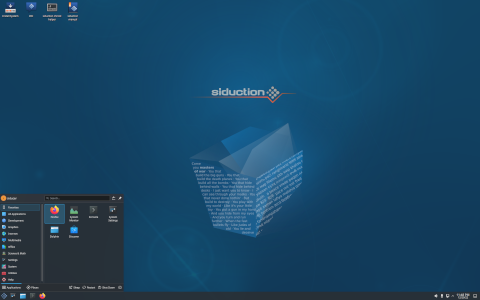
siduction is a Linux distribution derived from Debian’s unstable branch (commonly known as “Sid”). Its primary goal is to offer a modern, flexible, and up-to-date operating system for enthusiasts and power users who want access to the very latest software. By combining the raw power of Debian Sid with user-friendly tools, siduction aims to bridge the gap between cutting-edge development and practical daily use.
History
Origins
The project was started in late 2010 by a group of developers and Debian community members who felt that Debian Sid, while innovative, lacked certain conveniences for day-to-day desktop usage. Their vision was to provide a live system with easy installation, custom kernels, and additional tools out-of-the-box.
Evolution
Over the years, siduction has grown in scope. It moved from offering a single desktop environment to supporting multiple flavours, introduced proprietary driver support, and crafted its own live-installer. Regular re-spins and monthly ISO snapshots ensure users always have the freshest packages.
Key Features
- Rolling Release Model: Continuous updates from Debian Sid, avoiding major version upgrades.
- Multiple Desktop Environments: KDE Plasma, Xfce, LXQt, MATE, and more.
- Live Installer: A graphical, user-friendly installer based on Calamares.
- Custom Kernels: Various kernel flavours including Zen and Liquorix for performance tuning.
- Proprietary Driver Support: Out-of-the-box installation of Nvidia and AMD drivers if needed.
- APT-Based Package Management: Full compatibility with Debian’s APT tools (apt-get, apt, synaptic).
- Active Community: Forums, IRC channels, and mailing lists for support and development.
How It Works
Package Management
siduction relies on Debian’s APT ecosystem. Every package comes directly from Debian Sid repositories, supplemented by siduction’s own unstable repository for desktop packages, kernels, themes, and utilities. The update process follows:
- Fetch package lists via
sudo apt update. - Upgrade packages with
sudo apt full-upgrade. - Reboot if a new kernel or core library is installed.
Release Model
In contrast to fixed-point releases, siduction employs a rolling release strategy. Continuous integration means there are no distinct major releases—just regularly updated ISO images. Users can download monthly snapshots, which bundle all updates up to the release date. Installation followed by daily updates suffices to stay current.
Installation Process
The siduction live DVD/USB boots into a fully functional desktop environment. Key steps in the installation include:
- Booting in UEFI or Legacy BIOS mode.
- Selecting keyboard layout and language.
- Partitioning disks via guided or manual mode.
- Choosing desktop environment and optional kernels.
- Configuring users, passwords, and Bootloader (GRUB).
- Rebooting into the newly installed system.
Orientation and Target Audience
siduction is targeted at:
- Advanced Users who want bleeding-edge software.
- Desktop Enthusiasts seeking more control than typical Ubuntu-based distributions.
- Developers who need up-to-date compilers, libraries, and tools.
- Rolling-Release Fans looking for stability in an ever-evolving system.
While siduction designs for usability, a basic understanding of Linux command-line tools and Debian’s structure is recommended.
Desktop Environments
siduction offers official spins with the following DEs (Desktop Environments):
- KDE Plasma
- Xfce
- LXQt
- MATE
- GNOME (unofficial community spin)
- Openbox (minimalist community spin)
Community and Support
Forums and Channels
- Official forum: forum.siduction.org
- IRC channel: #siduction on libera.chat
- Mailing list: Accessible via Launchpad
- Social media: Twitter, Reddit
Contribution
Contributors can get involved by:
- Packaging software and submitting to the siduction repo.
- Maintaining ISO builds and website updates.
- Writing documentation or translating existing texts.
- Testing updates and reporting bugs at GitHub.
Comparisons
| Aspect | siduction | Debian Sid | Other Rolling Distros |
|---|---|---|---|
| Base | Debian unstable custom repos | Debian unstable only | Arch, openSUSE Tumbleweed |
| Installation | Live media with Calamares | Netinstall or debootstrap | Graphical installers in many cases |
| Desktop Choices | Multiple official spins | None by default | Multiple (depending on distro) |
| Kernel Options | Zen, Liquorix, Cloud | Vanilla only | Often Zan, Xanmod, etc. |
| Driver Support | Proprietary Open Source | Open Source only by default | Varies |
Curiosities
- Name Origin: “siduction” is a portmanteau of “Sid” and “conduction,” implying guidance through Debian unstable.
- Monthly ISO Nicknames: Every snapshot is given a codename like “Chimera” or “Mirage.”
- 64-Bit Only: siduction dropped 32-bit support early in 2016 to focus on modern hardware.
- Artwork and Themes: Custom wallpapers, icon packs, and login screens are refreshed frequently, often designed by community artists.
- Special Editions: Occasionally, the team produces themed ISOs (e.g., gaming edition with pre-installed Steam).
Notable Tools
- siduction-installer: A fork of Calamares with siduction-specific patches.
- sad (siduction Advanced Detector): A script for hardware detection and driver installation.
- srbt (siduction boot tool): Utilities to manage bootloader entries for multiple kernels.
Conclusion
siduction stands out as a distinctive distribution that harnesses the raw innovations of Debian Sid while wrapping them in a user-friendly, polished environment. Its rolling-release model ensures you always have access to the latest software, and its strong community backing provides stability and assistance. Geared towards advanced users, developers, and enthusiasts, siduction is an excellent choice for anyone seeking a powerful, flexible, and continually evolving Linux experience.
For more information, visit the official website: https://siduction.org
Leave a Reply