Introduction
Bedrock Linux is a pioneering meta-distribution that redefines traditional Linux paradigms by allowing users to combine components from multiple distributions into a single cohesive system. Unlike monolithic distributions, Bedrock Linux offers a modular, layered approach to package management, compatibility, and system configuration. It empowers enthusiasts, developers, and system administrators to leverage the strengths of different Linux ecosystems simultaneously, without resorting to virtual machines, containers, or chroot jails. This article explores what Bedrock Linux is, how it works under the hood, its intended audience and use cases, as well as curiosities, installation steps, community aspects, and comparative insights.
What Is Bedrock Linux?
Bedrock Linux breaks the mold of the “one-distro-fits-all” mindset by treating each distribution as a component that can be integrated into a unified operating system. In essence, it is:
- A Meta-Distribution – It does not develop its own packages in the traditional sense but instead imports binaries and repositories from other distributions.
- Compatibility Layer – It provides mechanisms to run software from diverse ecosystems (Debian, Arch, Fedora, etc.) seamlessly side by side.
- Chroot Replacement – Rather than isolating environments in a strict chroot, Bedrock Linux merges filesystems, libraries, and binaries to present a unified view.
The name “Bedrock” signifies the foundational layer upon which other distributions’ pieces can be assembled, akin to constructing a building upon a robust bedrock.
How It Works
Bedrock Linux’s brilliance lies in its technical architecture, which hinges on three key concepts: strata, rocks, and mountains.
Strata and Rocks
- Strata – These are complete distributions imported into Bedrock Linux. Each stratum retains its package manager, configuration files, and library versions.
- Rocks – A rock is a smaller, focused repository or a set of packages (e.g., a web server stack, a programming language runtime) that can be added alongside strata.
File Hierarchy and Union Mounts
Union mounts merge directories from different strata and rocks into a unified filesystem tree. Key mechanisms include:

- Layering /bin, /usr/bin, /lib, etc., from each stratum
- Prioritization rules determine which binary or library takes precedence
- Dynamic path adjustments via wrappers and symlinks
Libc and ABI Compatibility
Each stratum may use a different C standard library (glibc, musl, etc.). Bedrock Linux:
- Employs a compatibility wrapper to facilitate inter-stratum library calls.
- Prevents symbol clashes by namespacing library versions when required.
- Allows mixing high-performance musl-based software with glibc-based graphical applications seamlessly.
Process and Namespace Management
Bedrock Linux intercepts execve calls and adjusts environment variables (PATH, LD_LIBRARY_PATH) on the fly. This allows:
- Automatic resolution of the correct binary for a given command.
- Transparent operation for users and applications without special invocation.
Orientation and Use Cases
Bedrock Linux caters to a niche yet passionate audience that demands flexibility and customization beyond what standard distributions offer.
Target Audience
- Power Users – Those seeking to cherry-pick the latest packages from multiple distributions without booting virtual machines.
- Developers – People who need to compile and test against different library versions without maintaining multiple physical or virtual setups.
- System Administrators – Professionals managing heterogeneous environments who want a single host to serve multiple roles.
- Hobbyists – Enthusiasts intrigued by the challenge of mixing distributions and optimizing systems at a granular level.
Primary Use Cases
- Cross-Distro Package Adoption – Install Debian’s stable packages alongside Arch’s bleeding-edge software.
- Legacy Software Support – Run outdated or unmaintained software requiring older library versions while keeping a modern system core.
- Focused Development Environments – Spin up a Python, Ruby, or Node.js rock for isolated development without polluting the main system.
- Consolidated Server Infrastructure – Host services from various distributions on one physical machine with minimal overhead.
Installation and Configuration
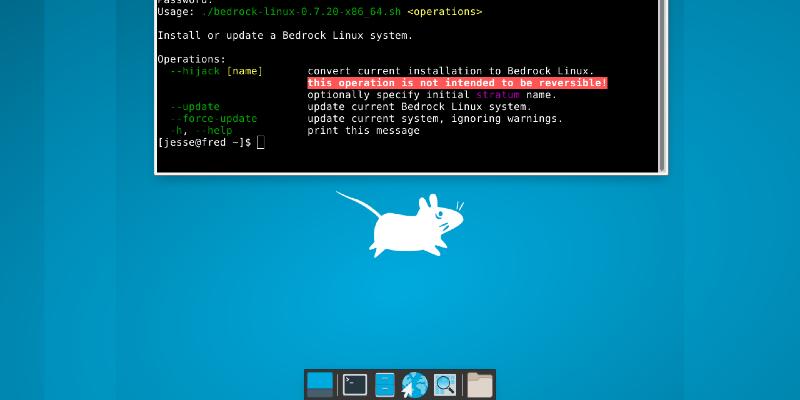
While Bedrock Linux’s end result is sophisticated, its installation process is designed to be straightforward for users comfortable with the command line.
Prerequisites
- A working Linux environment (any distribution that supports chroot, Linux kernel ≥ 3.10).
- Basic familiarity with partitioning, chroot, and shell commands.
- Internet access to fetch installation scripts and strata repositories.
Installation Steps Overview
1. Bootstrap the Bedrock Base
- Download and run the official install script from the Git repository.
- Create a minimal “mount point” directory that will become the Bedrock root.
- Initialize essential Bedrock Linux binaries and scripts in that directory.
2. Add Strata
- Use provided Bedrock commands (e.g., brl fetch) to import an entire distribution.
- Configure fstab and mount union layers for /usr, /etc, /var, and other key paths.
3. Integrate Rocks
- Install focused repositories or package sets for specialty needs.
- Configure custom wrappers or environment profiles for development stacks.
4. System Configuration
- Set up users, locales, and network interfaces in the unified /etc.
- Tweak bedrock.cfg to adjust stratum priority and union rules.
- Optionally enable a graphical environment by combining X.org from one stratum with desktop components from another.
Curiosities and Notable Features
- Origins – Created by Isaac Evans in 2014 to address frustrations with distro fragmentation and container bloat.
- Project Name – Originally called “MultiDistro,” renamed to Bedrock to emphasize stability and foundation.
- Rock Naming Conventions – Many rocklets are named after geological terms (e.g., “granite-pkgs” for core utilities).
- Self-Hosting – Bedrock Linux itself can run on Bedrock Linux, demonstrating its self-consistency.
- Minimal Dependencies – The base installation requires only a handful of scripts (
- Community Contributions – Users regularly submit new rock definitions for emerging languages and tools.
Community and Development
Maintainers and Contributors
Bedrock Linux is actively maintained by a small core team led by the original author, with contributors submitting pull requests for new strata, bug fixes, and documentation improvements.
Release Cycle and Versioning
- Bedrock Linux follows a rolling release model: new features are integrated continuously rather than in discrete versions.
- Stability patches and compatibility fixes are backported rapidly when issues arise.
Documentation and Support
- Official Installation Guide – Step-by-step instructions for bootstrapping and configuring strata.
- GitHub Repository – Source code, issue tracker, and community discussions.
- IRC and Matrix channels – Real-time support from developers and power users.
- Wiki and User-Contributed HOWTOs – Advanced topics such as custom strata creation, security hardening, and performance tuning.
Comparison with Traditional Distributions
| Aspect | Bedrock Linux | Single-Distro (e.g., Ubuntu) |
|---|---|---|
| Package Sources | Multiple (Debian, Arch, Fedora, etc.) | Single official repository |
| Library Versions | Mixed per stratum with compatibility wrappers | Unified glibc/musl version |
| System Isolation | Unified union mounts (no strict chroots) | Single root, optional containers |
| Installation Complexity | Moderate (command-line oriented) | Low (graphical installers available) |
| Maintenance | Rolling-release meta-maintained | Fixed-release or rolling, distro-specific |
Conclusion
Bedrock Linux stands out as a unique solution for those who demand the utmost flexibility in their computing environment. By enabling the seamless integration of multiple distributions, strata, and focused rocks, it removes traditional barriers between ecosystems without sacrificing stability or performance. Whether you are a developer who needs diverse toolchains, a system administrator managing heterogeneous services, or a hobbyist eager to experiment, Bedrock Linux provides an elegant, unified platform. Its active community, continuous updates, and minimal core footprint make it a compelling choice for advanced Linux users looking to transcend the limitations of single-distro paradigms.
Further Resources

Leave a Reply