Introduction
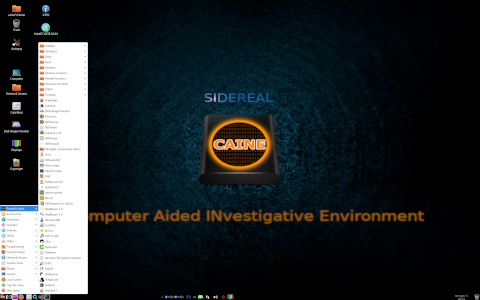
CAINE, which stands for Computer Aided INvestigative Environment, is a comprehensive GNU/Linux live distribution specifically crafted to support digital forensics investigations. It combines a wide array of open source tools under a unified graphical interface, facilitating evidence collection, preservation, analysis, and reporting. Originally conceived in 2008, CAINE has since evolved into a robust forensic platform used by law enforcement agencies, corporate security teams, academic researchers, and independent investigators. This article delves into what CAINE is, how it operates, its primary orientation and use cases, as well as some intriguing curiosities about its development and community.
What is CAINE?
Origin and Background
CAINE was initiated by Nanni Bassetti and his collaborators at the University of Modena and Reggio Emilia in Italy. The project was driven by the need to create an integrated forensic environment that could run as a live system, thereby minimizing the risk of altering the evidence on target machines. Over time, CAINE has been maintained by a dedicated international community, and it has undergone numerous releases, each adding new tools, improving usability, and expanding hardware compatibility.
Key Objectives
- Preservation of Evidence: Ensuring read-only mounting of storage media to prevent accidental modification.
- Integrated Forensic Workflow: Providing a single interface to coordinate multiple open source forensic utilities.
- Portability: Running as a live DVD/USB or installed on a local machine without leaving traces on the host.
- Reproducibility: Facilitating standardized procedures and reporting to support legal admissibility.
- Education and Training: Offering forensic educators and students a ready-to-use teaching and learning environment.
Core Components and Architecture
CAINE’s architecture is modular and designed to ensure reliability, extensibility, and ease of use. It is based on Ubuntu LTS releases and leverages the stability and security of the Debian/Ubuntu ecosystem.
Live Environment
The live environment boots from removable media (DVD, USB) using a customized Linux kernel with real-time forensic features. It includes:
- Safe mode: A restricted shell preventing accidental writes.
- Trusted mode: A full CLI/GUI environment for expert users.
- Stealth mode: Hides forensic tools to avoid tampering or interference.
Modular Design
CAINE is structured into modules, each encapsulating a set of related forensic tools and scripts. Modules can be dynamically loaded or updated, allowing investigators to customize the environment according to specific case requirements.
Main Modules
| Module | Description | Key Tools |
|---|---|---|
| Disk Forensics | Imaging, mounting, analysis of storage devices | dc3dd, ewf-tools, fiwalk |
| Memory Analysis | Memory acquisition and volatile data examination | LiME, Volatility |
| Network Forensics | Packet capture and protocol analysis | Wireshark, tcpdump, NetworkMiner |
| Malware Analysis | Static and dynamic inspection of malicious code | Radare2, Cuckoo Sandbox |
| Mobile Forensics | Extraction and analysis of smartphone data | Android Debug Bridge, libimobiledevice |
| Report Generation | Automated creation of case reports | Autopsy, Sleuth Kit frontends |
How CAINE Works
CAINE’s workflow is designed to guide investigators through a standardized forensic process, from evidence acquisition to reporting.
Boot Process and Live System
Upon booting, the system loads the custom forensic kernel and initializes the forensic persistence layer. All attached storage devices are automatically detected and listed in the “Forensics” menu. Devices are mounted in read-only mode by default, preventing any accidental write operations. Investigators can also create a session journal to record every operation performed during analysis, ensuring a complete audit trail.
Integration with Linux Tools
CAINE integrates over 200 open source forensic tools. Command-line utilities coexist with graphical frontends, allowing both novice and expert users to leverage the platform effectively. The distribution includes:
- Autopsy for file system analysis
- Volatility for memory forensics
- Wireshark for network packet inspection
- ExifTool for metadata extraction
Scripts and wrappers automate common tasks such as hashing, carving, timeline generation, and reporting.
User Interface and Workflow
Forensics Menu
The top-level menu organizes tools into categories: Acquisition, Analysis, Reporting, and Utilities. Investigators can quickly navigate to the required tool or script without memorizing complex commands.
Session Manager
The Session Manager records every action executed during the investigation, including tool invocations, parameters used, and timestamps. Sessions can be exported as logs, which are vital for chain-of-custody documentation.
Features and Capabilities
CAINE stands out for its comprehensive feature set tailored to digital forensics professionals:
- Automated Imaging: Create bit-by-bit images of disks and memory dumps.
- Hashing and Verification: Generate MD5, SHA-1, SHA-256 hashes to verify data integrity.
- File Carving: Recover deleted or fragmented files from raw data.
- Timeline Analysis: Produce event timelines from file system metadata.
- Registry and Browser Forensics: Extract and analyze Windows registry hives and browser histories.
- Malware Sandbox: Execute and monitor suspicious binaries in an isolated environment.
- Network Reconstruction: Reassemble network streams to recover transferred files and communications.
- Reporting Engine: Compile investigation findings into customizable HTML or PDF reports.
Use Cases and Orientation
CAINE’s design makes it versatile across multiple domains of digital forensics.
Digital Forensic Investigations
Law enforcement agencies use CAINE to conduct in-depth investigations of computer systems in criminal cases. The ability to boot a suspect machine from USB without modifying its internal hard drives is crucial for preserving evidence.
Incident Response
Corporate security teams leverage CAINE for onsite incident response. Rapid acquisition of volatile data, identification of malware, and quick extraction of network logs help contain breaches and restore systems.
Education and Training
Universities and training centers adopt CAINE as a teaching platform. Its live environment allows students to practice forensic techniques on simulated scenarios without risking damage to production systems. The transparency of open source tools fosters understanding and encourages innovation.
Advantages and Limitations
- Advantages:
- Completely free and open source.
- Live system with no installation required.
- Unified interface for dozens of forensic utilities.
- Session logging ensures reproducibility and auditability.
- Active community support and regular updates.
- Limitations:
- Performance overhead when running from USB or DVD compared to installed OS.
- Hardware compatibility can vary, especially with very new or rare devices.
- Steep learning curve for investigators unfamiliar with Linux.
- Some proprietary forensic tools are not included due to licensing constraints.
Curiosities and Lesser-Known Facts
- Custom Kernel Patches: CAINE’s kernel includes patches to prevent write-cache flush and ensure true read-only mounts.
- Auto-Updater: Since version 9.0, CAINE features an auto-update system that safely updates forensic tools without compromising existing sessions.
- Language Support: CAINE offers multi-language support, including Italian, English, Spanish, and Portuguese interfaces.
- Collaborations: The project has partnered with law enforcement agencies in Europe to incorporate feedback and real-world case studies.
- Virtual Appliance: Official virtual machine images are provided for VMware and VirtualBox to facilitate remote training and demonstration.
System Requirements and Deployment
| Component | Minimum | Recommended |
|---|---|---|
| Processor | Dual-Core 2.0 GHz | Quad-Core 3.0 GHz or higher |
| RAM | 4 GB | 8 GB or more |
| Storage | 8 GB USB stick or 4 GB DVD | 16 GB USB 3.0 stick or local SSD |
| Graphics | VGA-compatible | Full HD support |
| Network | Ethernet or Wi-Fi | Gigabit Ethernet |
Conclusion
CAINE stands as a testament to the power of open source in the realm of digital forensics. By integrating a vast collection of proven tools into a coherent, user-friendly live environment, it empowers investigators around the world to conduct thorough, reproducible, and legally sound analyses. Whether deployed for criminal investigations, corporate incident response, or academic instruction, CAINE’s combination of modular architecture, automated workflows, and rigorous evidence preservation techniques make it a cornerstone distribution for forensic professionals. For more information, documentation, and download links, visit the official CAINE website at https://www.caine-live.net/.
Leave a Reply