Introduction
FreePBX, formerly known as AsteriskNOW, is an open source graphical user interface (GUI) that simplifies the management and configuration of Asterisk, the powerful telephony engine. This article delves into what FreePBX is, how it works, its orientation toward different use cases, and some curiosities that make it an attractive solution for businesses, hobbyists, and call centers alike.
Origins and Evolution
Origins of Asterisk
Asterisk began as an open source PBX (Private Branch Exchange) software project launched by Digium in 1999. It provided voice-over-IP (VoIP) capabilities, digital and analog telephony integration, and a rich scriptable environment for developers. Asterisk itself was command-line driven, requiring manual editing of configuration files.
Emergence of AsteriskNOW
In 2007, Digium released AsteriskNOW as a turnkey Linux distribution bundling CentOS, Asterisk, and a basic GUI. It aimed to help small businesses and individuals quickly deploy a PBX without in-depth Linux or telephony expertise.
Rebranding to FreePBX
Over time, the community-driven FreePBX GUI gained popularity. In 2011, Sangoma Technologies acquired the FreePBX project and shifted branding from AsteriskNOW to FreePBX Distro. This rebranding emphasized the distinct identity of the web-based management interface, separate from the underlying Asterisk platform.
What is FreePBX?
FreePBX is a web-based, open source telephony GUI designed to manage Asterisk-based PBXs. It provides an intuitive interface for administrators to configure trunks, extensions, call routing, voicemail, and more, all without direct modification of Asterisk’s raw configuration files. FreePBX supports add–on modules, theme customization, and integrated reports, making it suitable for both novice users and large-scale deployments.
Key Features of FreePBX
- Graphical Configuration: Point-and-click interface to configure complex telephony features.
- Modular Architecture: Install, update, or remove modules to extend functionality.
- Multi-Tenant Support: Host multiple isolated PBXs on a single instance (via commercial modules).
- Advanced Call Routing: Interactive voice response (IVR), time conditions, ring groups, follow-me.
- Integrated Reporting: Call Detail Records (CDR) viewer, queue statistics, and CSV exports.
- Security Features: Fail2ban integration, built-in firewall, user and extension pin protections.
- Backup and Restore: Scheduled backups to local or remote storage (Sangoma Drive, SCP, FTP).
- Localization: Support for multiple languages and regional telephony standards.
Architecture and Components
Core Components
The FreePBX platform comprises the following core elements:
- Asterisk Engine: The telephony switch handling call control and media streaming.
- MySQL Database: Stores configuration data, voicemail metadata, CDR entries, and module settings.
- Apache or Nginx Web Server: Hosts the FreePBX web interface.
- PHP Runtime: Processes the GUI code and interacts with the database and Asterisk.
Module System
FreePBX uses a modular design. Each feature (Voicemail, DISA, Parking Lot, Conference Room, Fax, etc.) is implemented as a separate module. Administrators can enable or disable modules via the Module Admin page. Modules are categorized into:
- Core Modules: Vital for system functionality (Dashboard, Connectivity, User Management).
- Commercial Modules: Licensed add-ons for advanced features (Endpoint Manager, Call Recording Reports).
- Community Modules: Community-contributed plugins (Amazon Chime integration, WebRTC endpoints).
Web Interface
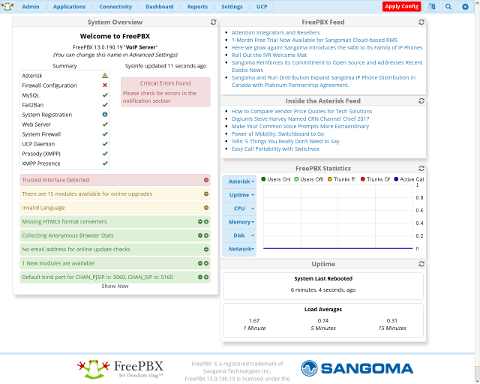
The web GUI is organized into sections:
- Dashboard: System status, recent calls, security alerts.
- Applications: Call flows like Queues, IVRs, Ring Groups.
- Admin: System setup, network settings, module admin, updates.
- Reports: Real-time queue stats, call detail records, call logs.
How FreePBX Works
Call Flow Management
FreePBX abstracts Asterisk’s dialplan into graphical elements. When a change is applied, the GUI compiles database-stored settings into extensions.conf and other configuration files. The Asterisk Manager Interface (AMI) is used to reload or restart modules without downtime.
Dial Plan Generation
The GUI converts user-defined routes and rules into Asterisk contexts and priorities. It automatically assigns priority numbers, jump labels, and condition checks to ensure predictable call handling. This automated generation reduces human errors in dial plan syntax.
Database Integration
Every configuration change is stored in the MySQL (or MariaDB) database. The freepbx.conf file defines database credentials, enabling PHP scripts to read/write settings. The realtime driver may be used to let Asterisk query the database directly for certain objects, such as voicemail users.
VoIP Protocol Support
FreePBX/Asterisk supports:
- SIP: Session Initiation Protocol for endpoint registration and call establishment.
- PJSIP: The newer, flexible SIP channel driver with advanced NAT and media handling.
- IAX2: Inter-Asterisk eXchange protocol for trunking multiple PBXs.
- WebRTC: Browser-based softphone integration via ethernet or HTTPS.
- FAX over IP: T.38 or G.711 pass-through for fax transmission.
Use Cases and Target Audience
FreePBX is oriented toward organizations and individuals needing customizable telephony systems. Typical audiences include:
- Small and Medium Businesses: Cost-effective office phone systems with voicemail, conferencing, auto attendants.
- Call Centers: Queue management, skill-based routing, real-time agent dashboards.
- Enterprises: Multi-node deployments, high-availability clusters, integration with CRM/ERP.
- Educational Institutions: Campus-wide PBX with intercom paging, classroom extension dialing.
- Hobbyists and Home Labs: Experimentation with VoIP protocols, private communications at home.
Installation and Deployment
| Method | Description | Advantages | Considerations |
|---|---|---|---|
| FreePBX Distro ISO | All-in-one installer including OS, Asterisk, FreePBX GUI | Quick setup, preconfigured | Less flexibility in OS choice |
| Manual Installation | Install CentOS/Ubuntu, then install Asterisk and FreePBX | Full control over versions | Requires Linux and Asterisk expertise |
| Docker Containers | Containerized FreePBX for microservices | Portability, isolation | Networking complexity, not officially supported |
| Virtual Appliance | Pre-built VM for VMware, KVM, Hyper-V | Rapid deployment in virtualized environments | Resource overhead of hypervisor |
Orientation and Practical Applications
Business Telephony
In corporate environments, FreePBX provides:
- Auto Attendants to route calls based on time or caller ID
- Unified Messaging with voicemail to email
- Call Recording for compliance or quality assurance
Call Center Operations
Core features include:
- Agent Login/Logout, Pauses, and Wrap-Up
- Real-Time Queue Monitoring and SLA Alerts
- Predictive Dialing via third-party integrations
Remote Workforce Support
With PJSIP and VPN integration, remote employees can register softphones securely. WebRTC phones embedded in the browser allow “click-to-dial” without additional hardware.
Educational Deployments
Campuses leverage FreePBX to:
- Connect dorms, lecture halls, and administration offices
- Provide audible paging to classrooms
- Offer VoIP lab exercises for telecommunications courses
Home and Lab Environments
IT enthusiasts set up FreePBX to:
- Test interoperability between codecs (G.722, Opus, GSM)
- Experiment with SIP trunk providers and NAT traversal
- Build voice-enabled smart home integrations
Popular Modules
| Module | Description | Category |
|---|---|---|
| Endpoint Manager | Provision and manage IP phones automatically | Commercial |
| Fax Pro | Integrated T.38 faxing with email gateway | Commercial |
| Conference Pro | Advanced conference room controls (PINs, music on hold) | Commercial |
| Blacklist | Block unwanted callers by number or CID pattern | Core |
| Music On Hold | Upload custom audio, configure multiple classes | Core |
Administration and Management
Routine Tasks
- Module Updates: Regularly check for security and feature updates.
- Backup Schedules: Automate data and configuration backups.
- Monitoring: Use built-in dashboard or SNMP integrations.
- Log Review: Analyze /var/log/asterisk and FreePBX logs for anomalies.
Security Considerations
- Fail2ban: Protect against brute-force registration attempts.
- Firewall: Limit access to SIP, SSH, GUI ports by IP or VPN.
- Strong Credentials: Enforce complex extension and user passwords.
- TLS/SRTP: Encrypt signaling and media for remote endpoints.
Curiosities and Interesting Facts
- Large Deployments: Some global enterprises run tens of thousands of concurrent calls on clustered Asterisk/FreePBX nodes.
- Community-Driven: Over 750,000 active installations worldwide as of 2023.
- Events: The annual AstriCon conference often features FreePBX talks and workshops.
- Certification: Sangoma offers a FreePBX Professional certification for administrators.
- Third-Party Integrations: CRM connectors (Salesforce, Zoho), ERP bridges (Odoo), and chat platforms (Slack, Microsoft Teams).
- Scalability: From single phone deployments to geo-redundant architectures across data centers.
- Open Source Ecosystem: Hundreds of community modules and themes available on the FreePBX Community Repository.
Conclusion
FreePBX stands as a versatile, open source telephony solution that brings the power of Asterisk to a broader audience through its intuitive GUI and modular architecture. Whether deployed in small offices, large enterprises, educational institutions, or home labs, FreePBX offers scalability, flexibility, and cost savings. Its active community, commercial ecosystem, and continuous development ensure that new features and security enhancements will keep it relevant for years to come.
Leave a Reply