Introduction
NethServer is an open source, CentOS-based Linux distribution designed to simplify the management of network services and server tasks. This article explores what NethServer is, how it works under the hood, its primary orientations and use cases, as well as some curiosities and comparisons. Whether you’re a system administrator, an IT enthusiast or a small business owner, understanding NethServer can help you decide if it fits your needs.
What is NethServer?
Definition
NethServer is a modular Linux distribution tailored for use as a unified network server. It provides an integrated, web-based interface to manage services such as firewall, content filter, email, file sharing, virtualization and more—all from a single dashboard.
History and Background
- Originated in 2010 by Alessandro Zanardi and team, based in Italy.
- Built on top of CentOS (now migrating to AlmaLinux after CentOS 8’s end of life).
- First stable release in 2011, with regular updates and major releases every 1–2 years.
- Today governed by the NethServer Project, an open community of developers and contributors.
Architecture and Core Components
Modular Design
NethServer adopts a modular architecture, allowing administrators to enable or disable specific services via modules. Each module corresponds to a particular functionality—mail server, web proxy, directory services, etc.
Base Operating System
The foundation is CentOS/AlmaLinux, providing:
- Stability: Enterprise-grade kernel and long-term support.
- Security: SELinux policies, timely security updates.
- Package Management: YUM/DNF for software installation and updates.
Web-based Administration
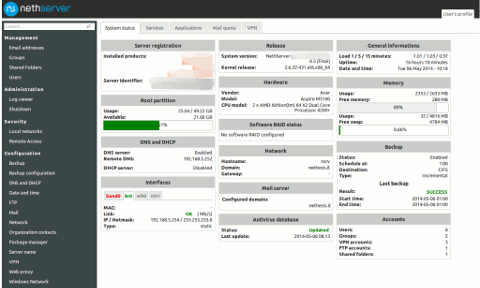
NethServer’s hallmark is its Web User Interface (UI), built on Node.js and AngularJS, which offers:

- Centralized dashboard for real-time system status.
- Step-by-step wizards for configuration.
- Role-based access control for multiple administrators.
Packages and Modules
Core Modules
- Firewall and Intrusion Detection (SNORT)
- VPN Services (OpenVPN, IPsec)
- Directory and Authentication (OpenLDAP, Samba4 AD)
- Email Server (Postfix, Dovecot, Roundcube)
Optional Modules
- Web Proxy and Filtering (Squid, DansGuardian)
- Collaboration (Nextcloud, OnlyOffice)
- Virtualization (KVM, Cockpit integration)
- Backup (Bareos, UrBackup)
How NethServer Works
Installation Process
Hardware Requirements
- CPU: 1.4 GHz 64-bit or faster.
- RAM: Minimum 2 GB (4 GB recommended for production).
- Disk: At least 20 GB for OS, additional based on data needs.
- Network: One or more Gigabit NICs.
Software Requirements
- Bootable ISO image of NethServer (latest stable release).
- BIOS/UEFI set to boot from USB/DVD media.
Installation Steps
- Download ISO from official site.
- Create bootable media (USB/DVD).
- Boot server and follow text-based installer.
- Set root password, network settings, time zone.
- Reboot into the fresh system initial web interface available at https://[server-ip]:980/.
Configuration Workflow
Upon first login, the server presents a configuration wizard that guides you through:
- Language and time settings.
- Network and firewall zones.
- Module selection.
- Administrator account creation.
After the wizard, you can fine-tune each module via dedicated pages.
Web Interface Features
- Dashboard: Summarizes CPU, memory, disk, network usage and alerts.
- Software Center: Install, update or remove modules.
- System Services: Start/stop/restart services, check logs.
- Backup Manager: Schedule and monitor backups.
- Audit Trails: Track changes made by administrators.
Orientation and Use Cases
Small and Medium Enterprises
SMEs benefit from NethServer as it consolidates multiple servers into one:
- File sharing and collaboration.
- Secure email gateway.
- Reliable DNS and DHCP services.
- Content filtering to enforce company policies.
Educational Institutions
- Manage student and staff accounts via LDAP/AD.
- Host e-learning platforms (Moodle, Nextcloud).
- Segregate networks for labs, staff, guests.
Home Labs and Enthusiasts
Hobbyists explore enterprise features at home:
- Virtualize test environments with KVM.
- Experiment with firewall rules and VPN.
- Run private cloud services (Nextcloud, OnlyOffice).
Non-Profit Organizations
- Cost-effective way to deploy IT infrastructure.
- Active community support without licensing fees.
- Easy-to-use interface for volunteers with limited sysadmin skills.
Key Features and Modules
Network Services
- DHCP/DNS: Automatically assign IPs and resolve names.
- VPN: Secure remote access via OpenVPN or IPsec.
- Proxy: Web caching and filtering to save bandwidth.
Security and Firewall
- Zone-based Firewall: Define trust levels for LAN, WAN, DMZ.
- Intrusion Detection: SNORT integration with alerts.
- Brute-force Protection: Fail2ban rules across services.
Collaboration Tools
- Email: Postfix, Dovecot, Roundcube for webmail.
- Chat: Available via Rocket.Chat module.
- File Sync: Nextcloud with calendars, contacts, documents.
Backup and Storage
- Local and Remote Backup: Bareos agent and server.
- Disk Quotas: Manage user and group storage limits.
- Snapshot Support: Leverage LVM snapshots for quick recovery.
Virtualization
- KVM/QEMU: Host multiple VMs on a single hardware node.
- Web Console: VNC access via Cockpit integration.
Community and Ecosystem
Support Channels
- Official forum at community.nethserver.org
- Documentation wiki at docs.nethserver.org
- Issue tracker on GitHub: github.com/NethServer
Community Contributions
Modules, bug fixes, translations and tutorials are contributed by volunteers. Additionally, commercial support and consultancy are available through certified partners.
Advantages and Considerations
Pros
- All-in-one solution: Consolidates multiple server roles.
- User-friendly: Intuitive web UI reduces CLI dependency.
- Extensible: Rich module ecosystem.
- Cost-effective: No licensing fees for core functionality.
Cons
- Resource Usage: Some modules consume significant RAM and CPU.
- Learning Curve: Unique UI conventions may differ from other distros.
- Module Compatibility: Third-party modules may vary in quality or maintenance.
Curiosities and Interesting Facts
- NethServer’s core developers met during an open source summit in Bologna, Italy.
- The logo combines a net-like mesh with server rack imagery.
- It has been translated into over 20 languages by community volunteers.
- An annual NethServer Summit gathers contributors for code sprints and workshops.
Comparison with Other Distributions
| Feature | NethServer | ClearOS | Zentyal |
|---|---|---|---|
| Base OS | CentOS/AlmaLinux | RHEL/CentOS | Ubuntu LTS |
| Web UI | Node.js / AngularJS | PHP / Laravel | PHP / Symfony |
| Package System | YUM/DNF | YUM | APT |
| Primary Audience | SMEs, Community | SMBs | SMBs, Education |
| Licensing | GPLv3 | GPLv3 / Commercial | AGPLv3 / Commercial |
Conclusion
NethServer stands out as a versatile, user-friendly server distribution that integrates many services into a single package. Its modular approach, combined with a robust web interface and active community, makes it an appealing choice for small and medium environments, educational institutions, non-profits and home labs. While resource demands and module compatibility are factors to consider, the benefits of centralized management, security features and collaboration tools often outweigh the drawbacks.
References
- NethServer Official Website
- NethServer Documentation
- NethServer Community Forum
- NethServer on Wikipedia
Leave a Reply