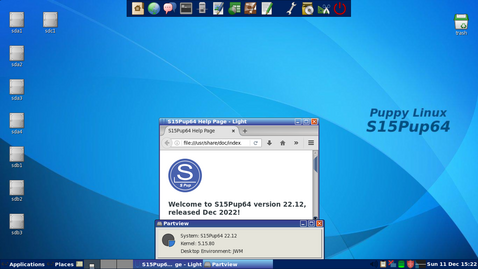
Introduction to Puppy Linux
Puppy Linux is a lightweight, user-friendly Linux distribution designed to run entirely from RAM, enabling fast performance even on older hardware. Created by Barry Kauler in 2003, Puppy Linux has grown into a family of distributions—each tailored to different use cases—while maintaining its core philosophy of simplicity, speed, and minimal resource requirements. As an agile and flexible operating system, Puppy Linux appeals to beginners and experienced users alike.
History and Evolution
Origins
The early 2000s saw the rise of Linux distributions aimed at bringing the open-source experience to users with limited hardware. In this context, Barry Kauler developed Puppy Linux with the goal of creating a compact operating system that could boot from CDs, USB drives, or other removable media. The first official release appeared in June 2003 and weighed in at under 50 MB.
Major Releases and Derivatives
- Puppy1.x and 2.x Series – The initial versions focused on core utilities, a custom graphical installer, and busybox integration.
- Puppy3.x Series – Introduced improved hardware detection and optional support for UnionFS.
- Puppy4.x Series – Transitioned to devx packages, providing on-the-fly compilation capabilities.
- Puppy5.x–6.x Series – Brought in PET package management, backing up the ability to install standard .deb and .rpm packages.
- Community Editions – Examples include Quirky, Wary, Racy, and the more recent BionicPup, Slacko, Tahrpup, and Xenialpup, each based on different Ubuntu or Slackware cores.
How Puppy Linux Works
Puppy Linux differentiates itself by the way it loads, stores, and manages files. Understanding its architecture reveals how it achieves remarkable performance on modest systems.
Live Boot Mechanism
Puppy Linux can boot from:
- Optical media (CD/DVD)
- USB flash drives
- Internal hard drives via frugal or full installations
Live booting places the entire root filesystem into a compressed image file (e.g., pup_xxx.sfs) which is then loaded into RAM. Once in memory, Puppy can unmount the boot media, offering flexibility for removal or reuse.

Union Filesystem and Overlay Layering
Puppy employs a union filesystem such as UnionFS or aufs, which merges multiple file layers into a single coherent view:
- Read-Only Layers – Includes the base .sfs modules and the original compressed filesystem.
- Read-Write Layer – A RAM-based layer where changes, installations, and user settings are accumulated.
SFS Modules
SFS (SquashFS) modules contain software collections. Users can load or unload modules at runtime, customizing their environment without affecting the core system.
Save Files and Persistent Storage
On shutdown, any changes in the RAM layer are saved to a designated save file or save folder on the boot medium. This mechanism supports:
- Session persistence across reboots
- Multiple save files for different configurations
Orientations and Use Cases
Puppy Linux’s target audience and real-world uses span various scenarios:
- Reviving Old Hardware – Ideal for PCs with minimal RAM and slower CPUs that struggle with mainstream distributions.
- Portable Workspace – Bootable USB with all user settings and applications in a single save file.
- System Rescue and Recovery – Tools for disk partitioning, data recovery, and network diagnostics come pre-installed.
- Educational Environments – A safe platform to teach Linux basics, scripting, and system administration without risking existing installations.
- Embedded Systems and IoT Prototypes – The tiny footprint makes Puppy Linux suitable for custom embedded projects.
System Requirements
| Requirement Category | Minimum | Recommended |
|---|---|---|
| Processor | 300 MHz Pentium II | 1 GHz Pentium III or higher |
| Memory (RAM) | 256 MB | 512 MB or more |
| Storage | 100 MB for the ISO | 1 GB for save files and extra applications |
| Graphics | VGA capable | Accelerated GPU support optional |
| Boot Media | CD/DVD drive or USB port | USB 2.0 or 3.0 recommended |
Key Features
- Small Footprint – ISO images typically under 300 MB.
- Modular Design – Load or unload SFS modules to extend functionality.
- Fast Boot and Operation – Entire system runs in RAM.
- Comprehensive Hardware Detection – Includes drivers for Wi-Fi, graphics, printers, and more.
- Simple Package Management – PET packages and support for DEB/RPM.
- Multiple Window Managers – JWM (Joe’s Window Manager) by default, with options like Openbox.
Software and Package Management
Puppy provides:
- Puppy Package Manager (PPM) – A GUI tool to browse, install, and remove packages from various repositories.
- SFS Loader – A utility to mount or unmount SFS modules dynamically.
- Universal Package Support – Integration with Ubuntu, Debian, and Slackware repositories depending on the Puppy base.
Building Your Own Puppy
For advanced users, the Woof-CE (Community Edition) build system allows creation of custom Puppy derivatives from Ubuntu, Debian, or Slackware packages. It automates:
- Collecting packages
- Configuring build scripts
- Producing bootable ISO images
Customization and Community
Puppy Linux has an active forum and a network of contributors who produce:
- Remasters – Customized versions with pre-installed software for specific tasks (multimedia, education, security).
- Themes and Extensions – A variety of icon sets, wallpapers, and JWM menu configurations.
- Scripts and Utilities – Community-developed tools for backup, network setup, and media conversion.
Frugal vs. Full Installations
- Frugal Install – Places only essential files on the hard drive while still leveraging save files for persistence.
- Full Install – A traditional hard-disk installation with separate /home, swap, and system partitions.
Community Editions and Variants
Every major base release spawns community spins such as:
- BionicPup (Ubuntu 18.04 LTS core)
- Slacko (Slackware core)
- Tahrpup (Ubuntu 14.04 core)
- Xenialpup (Ubuntu 16.04 core)
Interesting Facts and Curiosities
- Puppy’s ISO size often remains smaller than many single installer packages from mainstream distributions.
- The name “Puppy” reflects its small size, agility, and playful design approach.
- Despite its minimalism, Puppy Linux includes multimedia codecs, network tools, and office software out of the box.
- Some users run Puppy entirely from portable DVD players or SD cards on laptops and netbooks.
- Puppy’s forums have over tens of thousands of active members sharing remasters and support tips.
- Woof-CE can generate a new Puppy build in under 30 minutes on modern hardware.
Conclusion
Puppy Linux stands out in the landscape of Linux distributions due to its combination of speed, flexibility, and low resource requirements. Whether you seek to breathe new life into aging hardware, create a portable toolkit for diagnostics, or simply enjoy a minimalist desktop experience, Puppy Linux delivers a robust set of features in a compact package. Its thriving community and modular design ensure that Puppy will continue evolving, offering innovative solutions and lightweight alternatives to users around the globe.
Sources:
http://puppylinux.com
https://en.wikipedia.org/wiki/Puppy_Linux
Leave a Reply