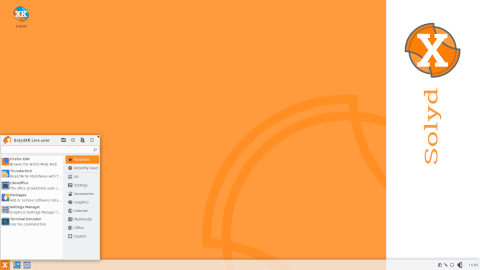
Introduction to SolydXK
SolydXK is a Debian-based Linux distribution designed to deliver a stable, secure, and user-friendly experience. It combines the reliability of Debian’s testing branch with a curated set of desktop environments and applications, making it an ideal choice for both newcomers and experienced users. The name SolydXK reflects its two main editions: “SolydX” (with the Xfce desktop) and “SolydK” (with the KDE Plasma desktop).
Origins and History
Debian Base
SolydXK builds upon the robust foundation of Debian, one of the oldest and most respected Linux distributions. By tracking the Debian testing branch, SolydXK benefits from a balance between up-to-date software and system reliability. The decision to use Debian as a base ensures:
- Regular security updates
- Vast software repositories
- A large and active community
Initial Release
The project was initiated in 2012 by a small group of developers who recognized a gap between cutting-edge distributions and those that prioritized stability. Their goal was to craft a distribution that stayed current without compromising on reliability. The first public release of SolydXK quickly gained attention for its polished interface, comprehensive hardware support, and sensible choice of default applications.
Features and Components
SolydXK stands out through its careful selection of applications, tools, and defaults. Each component is chosen to provide a cohesive user experience.
Desktop Environments: Xfce and KDE
- SolydX: Uses the Xfce desktop environment, known for its lightweight footprint and speed. Ideal for older hardware or users who prefer simplicity.
- SolydK: Employs KDE Plasma, featuring rich customization options and modern visual effects. Suitable for power users and those seeking a full-featured desktop.
Package Management
SolydXK utilizes the Advanced Packaging Tool (APT) from Debian, enabling users to install, update, and remove software effortlessly. Key tools include:
- apt-get and apt for command-line operations
- Synaptic Package Manager for graphical package management
- Custom scripts for automatic updates and maintenance
Security and Stability
Security is a core principle of SolydXK. The project integrates:
- Regular security advisories from Debian
- Custom firewall configuration via Firewalld
- Pre-installed antivirus definitions (ClamAV) for scanning downloads
How SolydXK Works
Understanding the inner workings of SolydXK involves exploring its architecture, installation process, and update mechanisms.
System Architecture
At its core, SolydXK consists of:
- Linux Kernel (custom-patched for enhanced hardware compatibility)
- Debian testing repositories for software packages
- Custom configuration files (dotfiles) for desktop environments
- Additional scripts and tools maintained by the SolydXK team
Installation Process
Installing SolydXK is streamlined and accessible to both novices and experts.
Live DVD/USB
The distribution provides a Live image that can be booted from DVD or USB. This environment allows:
- Testing hardware compatibility
- Evaluating desktop environments before installation
- Accessing built-in rescue tools
Installer Steps
The included graphical installer guides the user through:
- Language and locale selection
- Disk partitioning (manual or guided)
- Package selection (minimal, standard, full)
- Bootloader configuration
- User account setup
Software Repositories and Updates
SolydXK relies primarily on Debian’s testing branch, supplemented by its own “solydxk” repository for:
- Custom desktop tweaks
- Enhanced multimedia codecs
- Proprietary drivers where necessary
The update policy aims to deliver security patches within 24–48 hours of Debian releases, while major software upgrades undergo additional testing by the SolydXK team.
Target Audience and Orientation
SolydXK caters to a broad range of users, from home enthusiasts to small enterprises.
Home Users
For desktop users, SolydXK offers:
- A pre-configured office suite (LibreOffice)
- Multimedia applications (VLC, GIMP)
- Web browsers (Firefox, Chromium)
Small Businesses
Businesses benefit from:
- Shared network folders via Samba
- Remote desktop services (XRDP)
- Automated backup tools (Deja Dup)
Educational Use
In educational settings, the distribution is praised for:
- Ease of deployment on multiple machines
- Low hardware requirements
- Inclusion of programming tools (Python, GCC)
Customization and Usability
SolydXK prides itself on user-centric defaults and easy customization. Key highlights include:
- Panel layouts pre-arranged for common workflows
- Window manager tweaks to enhance productivity
- Theme selection tool for quick interface changes
- Keyboard shortcuts pre-mapped for multimedia control
Curiosities and Community
Beyond its technical aspects, SolydXK has several interesting facets:
- Community-driven development: Users can propose features via the official forum.
- Donation-based: The project accepts donations to fund hosting and hardware purchases.
- Derived from multiple contributions: Several custom scripts originate from community members.
- Live forum events: Regular QA sessions with developers.
Comparison with Other Distributions
| Distribution | Base | Desktop | Release Model | Target Audience |
|---|---|---|---|---|
| SolydXK | Debian Testing | Xfce / KDE | Point releases | General purpose, stability-focused |
| Ubuntu LTS | Debian Unstable → Ubuntu | GNOME (default) | Fixed (every 2 years) | Beginners, enterprises |
| Linux Mint | Ubuntu LTS | Cinnamon / MATE | Fixed (every 6 months) | Home users |
| Manjaro | Arch Linux | Xfce / KDE / Others | Rolling release | Enthusiasts, power users |
System Requirements
- CPU: 1 GHz or faster
- RAM: 1 GB minimum (2 GB recommended)
- Disk Space: 10 GB minimum
- Graphics: VGA resolution (1024×768) or higher
Release Cycle and Support
SolydXK follows a point release model, typically issuing new ISO images every 6–12 months. Each release is supported for at least 18 months, aligning with Debian’s security updates. Users can upgrade between releases via the package manager or perform fresh installations using the latest media.
Getting Started with SolydXK
- Download the latest ISO from the official website: https://solydxk.com
- Create a bootable USB with tools like Etcher or Rufus
- Boot your system from the USB and choose “Try” or “Install”
- Follow the on-screen installer to complete setup
- Reboot and enjoy a stable, secure desktop environment
Additional Resources
- Official Website: https://solydxk.com
- Community Forum: https://forums.solydxk.com
- Documentation Wiki: https://wiki.debian.org/SolydXK
- Distribution Stats: https://distrowatch.com/table.php?distribution=solydxk
Conclusion
SolydXK represents a harmonious blend of Debian’s proven stability and the versatility of modern desktop environments. Whether you are seeking a lightweight system for older hardware or a fully-featured desktop for daily productivity, SolydXK delivers a dependable and adaptable platform. With its active community, regular updates, and clear focus on usability, it remains a compelling choice for Linux users worldwide.
Leave a Reply