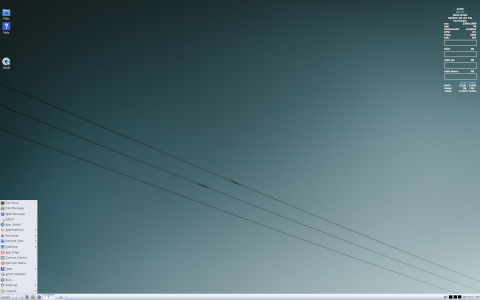
Introduction to antiX
antiX is a lightweight, Debian-based Linux distribution designed to offer speed and flexibility on older hardware, while maintaining a user-friendly experience. Originating as a fork of MEPIS Linux in 2007, antiX has evolved into a fully independent project that prioritizes efficiency, modularity, and accessibility. Whether you are reviving a legacy machine, seeking a minimalist desktop environment, or simply curious about alternative Linux distributions, antiX provides a unique and powerful solution.
What is antiX?
antiX is a complete operating system built on the Debian Stable base. It focuses on delivering a fast, low-resource computing experience. Unlike many mainstream distributions that require significant memory and processing power, antiX targets systems with as little as 256 MB of RAM and single-core CPUs, making it ideal for older or resource-constrained machines.
History
The project was initiated by Anticapitalista (also known as Elvis Angelaccio) and a small team of volunteers in 2007. The initial goal was to create a lightweight alternative to the standard MEPIS release by removing heavy components such as KDE and replacing them with lighter window managers. Over time, antiX gained an independent identity, moving its repositories and infrastructure to self-hosted servers and adopting its own release cycles.
Design Philosophy
antiX adheres to four core principles:
- Lightness: Minimal resource consumption to run smoothly on old or low-end hardware.
- Modularity: Users can choose components (window manager, applications) to suit their needs.
- Stability: Based on Debian Stable for reliability and long-term support.
- Freedom: Open-source software with a commitment to user control and transparency.
How antiX Works
antiX is built on top of Debian’s package management and system architecture, but it replaces many default components with lighter alternatives, while offering familiar tools for installation, configuration, and system maintenance.
Base System
The base system is essentially Debian Stable without the systemd init system. Instead, antiX uses SysVinit or Runit as the init system, giving users a choice between traditional and modern, parallelized service management. This design reduces boot-time complexity and allows for easy service control.
Package Management
Package management in antiX relies on APT (Advanced Package Tool) and Debian repositories, supplemented with antiX-specific repositories for specialized packages and backports. Users can install software via command-line tools such as apt-get or graphical front-ends like Synaptic. Regular updates follow Debian’s security and update policy, with additional patches from the antiX team.
Desktop Environments and Window Managers
antiX offers multiple session options, ranging from full desktop environments to bare window managers:
- IceWM: A lightweight, easy-to-configure window manager with a taskbar and system tray.
- Fluxbox: Highly configurable, with a small memory footprint and support for themes.
- JWM (Joe’s Window Manager): Minimalist design, very low resource usage.
- herbstluftwm, openbox: Tiling and stacking managers for more advanced users.
Additionally, the antiX-core and antiX-base versions allow users to build a custom system from scratch, selecting only the components they need.
Orientation and Use Cases
antiX is oriented towards several key user groups and scenarios:
For Old and Low-Resource Computers
antiX can breathe new life into hardware that struggles with modern operating systems. Systems with 256 MB of RAM, Pentium II or III processors, and limited disk space can handle daily tasks such as web browsing, text editing, and email using lightweight applications.
For Privacy and Minimalism Enthusiasts
Without systemd, antiX appeals to users who prefer simplicity and transparency in their init system and service management. The minimal default installation reduces the attack surface and avoids unnecessary background processes.
For Educational and Laboratory Environments
Schools, libraries, and community centers with mixed hardware often need a single OS image that runs reliably on all machines. antiX’s live and installation modes allow for speedy deployment and consistent performance, even on varying hardware configurations.
Key Features of antiX
| Feature | Description |
|---|---|
| Debian Stable Base | Ensures a rock-solid foundation with well-tested packages and security updates. |
| Multiple Init Systems | Choose between SysVinit and Runit for service management. |
| Variety of Window Managers | IceWM, Fluxbox, JWM, Openbox, and more for different tastes. |
| Live Mode with Persistence | Run from USB or CD/DVD, with optional persistence for saving settings. |
| Full and Core Installers | Install a complete desktop or build a custom minimal system from scratch. |
| Custom AntiX Tools | Graphical utilities for system configuration, network setup, and user management. |
Installation Process
Installing antiX is straightforward and well-documented. The distribution provides graphical and text-based installers tailored to different user preferences.
System Requirements
- CPU: Pentium II or newer (i486 for older releases).
- RAM: 256 MB minimum (512 MB or more recommended for full desktop).
- Disk Space: 5 GB minimum for a full installation.
- Boot Media: USB flash drive or CD/DVD drive.
Installation Steps
- Download ISO: Obtain the appropriate ISO image for your needs from the official site or mirrors.
- Create Boot Media: Use tools like Rufus or UNetbootin to write the ISO to a USB stick, or burn it to a CD/DVD.
- Boot System: Insert the media, reboot, and select the antiX live environment in the BIOS/UEFI boot menu.
- Live Environment: Explore the live session use the Configure antiX tool to set language, keyboard, and network.
- Run Installer: Launch the antiX Installer from the start menu. Choose between full, base, or core installation.
- Partitioning: Use guided partitioning or manual mode (with cfdisk, GParted).
- User Setup: Create root and normal user accounts, set passwords.
- Finalize: Review settings, install GRUB, and complete the installation. Remove media and reboot.
Curiosities and Notable Aspects
Live Mode and Persistency
One of antiX’s standout features is its ability to run entirely from removable media in a persistent live mode. Users can save documents, install additional software, and tweak system settings without altering the host machine’s internal drive.
Persistence Mechanism
- antiX creates a file or partition labeled antix_overlay to store changes.
- On each boot, the system merges the read-only squashfs image with the writable overlay.
- Users can enable or disable persistence, choosing a fresh session or continuing from previous state.
Community and Development Model
antiX is developed by a small core team, supplemented by a dedicated community of testers, translators, and contributors. The project emphasizes inclusivity, offering forums, mailing lists, and IRC channels for support and discussion. Regular donations and volunteer contributions fund hosting, infrastructure, and development.
Version Naming Convention
antiX releases follow a two-part scheme: antiX version number suffix (e.g., “antiX 21-full” or “antiX 23-base”). The version number aligns with the underlying Debian Stable release, while the suffix defines the edition:
- full: Complete desktop with recommended applications.
- base: Minimal desktop environment with core applications.
- core: CLI-only, no X Window System, ideal for building custom setups.
Conclusion
antiX stands out in the Linux ecosystem by offering a lightweight, stable, and flexible environment that caters to both beginners and advanced users. Its commitment to minimalism, combined with Debian’s robust foundation, results in a distribution capable of running on nearly any hardware while providing modern Linux capabilities. Whether you are refurbishing aging computers, pursuing a minimalist lifestyle, or exploring alternative init systems, antiX delivers a remarkably efficient and customizable experience.
Sources:
If you want to learn more about antiX, I’d recommend using Udemy. I use it myself, and they have Linux courses that can really give you a boost compared to learning everything on your own.
Leave a Reply