Introduction
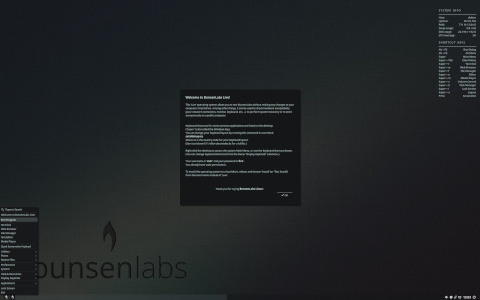
BunsenLabs Linux is a lightweight, community-driven Linux distribution derived from Debian. It aims to provide an elegant and efficient desktop experience on older hardware, as well as for users who appreciate a minimal yet configurable environment. In this extensive article, we explore what BunsenLabs Linux is, how it works, its target audience, key features, installation process, and some interesting curiosities that make it unique.
What Is BunsenLabs Linux?
Historical Background
BunsenLabs Linux emerged in 2015 as the spiritual successor to the CrunchBang distribution, which was renowned for its simplicity and performance on low-end machines. When the CrunchBang project was discontinued, a group of volunteers decided to continue its legacy by forking Debian Jessie and building an active community around a similar vision.
Core Philosophy
- Lightweight Efficiency: Use minimal resources without sacrificing usability.
- Customizability: Provide easy-to-edit configuration files and scripts.
- Accessibility: Remain user-friendly for both new and experienced Linux users.
- Community-Driven: Foster open development and community contributions.
How It Works
Base System
BunsenLabs Linux is built on the stable branch of Debian, ensuring reliability, security updates, and access to the vast Debian repository. By selecting Debian as its base, BunsenLabs inherits a robust package management system and long-term support.
Openbox Window Manager
The default graphical interface is provided by Openbox, a highly configurable stacking window manager. Openbox handles window placement, decorations, and keybindings without the bloat of a full desktop environment.
- Lightweight design with minimal RAM usage.
- Comprehensive theming capabilities using GTK .
- Custom menus and global keybindings defined in XML.
Configuration and Customization
BunsenLabs provides a set of scripts named bl-welcome and bl-config:
- bl-welcome: A graphical welcome screen to guide new users through basic setup tasks such as installing proprietary drivers, codecs, and additional software.
- bl-config: A command-line utility to manage desktop settings, themes, and configuration files in one place.
Target Audience and Orientation
Low-Resource Systems
BunsenLabs is particularly suited for:
- Older laptops and desktops with limited CPU power and RAM.
- Embedded systems where a full desktop environment is unnecessary.
DIY Enthusiasts and Tinkerers
Users who love customizing their environment will appreciate:
- Openbox’s straightforward XML configuration.
- Pre-configured scripts that simplify tweaks.
- Community themes, wallpapers, and icon packs.
Educational Use
BunsenLabs can serve as a learning platform for students and hobbyists to understand:
- Debian package management (APT, dpkg).
- Window management principles in Openbox.
- Shell scripting and system configuration.
Installation and Setup
System Requirements
- 512 MB of RAM (minimum), 1 GB recommended.
- 5 GB of disk space for a minimal installation.
- Modern CPU (i686 or amd64 architecture supported).
Installation Process
Live Environment
The ISO image includes a live environment to test hardware compatibility and desktop layout before installation. Users can explore Openbox, menus, and pre-installed applications without touching the hard drive.
Partitioning
- Manual partitioning with cfdisk or GParted in the live session.
- Separate /home partition recommended for easy data preservation.
- Swap partition depending on RAM size and hibernation needs.
Post-Installation Setup
- Run bl-welcome to install graphics drivers, codecs, and recommended software.
- Use bl-config to tweak the appearance (themes, fonts, wallpaper).
- Configure additional repositories or backports if newer software is needed.
Key Features
Lightweight Footprint
An out-of-the-box BunsenLabs system uses around 150–200 MB RAM after boot, compared to >500 MB for full desktop environments.
Package Management
BunsenLabs users leverage Debian’s APT system for installing, removing, and updating software:
- apt-get, aptitude, and synaptic for command-line and GUI management.
- Access to over 59,000 packages in Debian repositories.
- Optional third-party repos and backports for bleeding-edge versions.
Custom Openbox Menus
The default menu is dynamically generated from .desktop files, yet users can override it with a static XML menu:
- Easily add custom scripts, categories, and submenus.
- Create context-specific menus for right-click on the desktop or panels.
Curiosities
- Community and Derivative Projects: Some users have created remixes such as BunsenLabs Helium for newer Debian releases or spins with alternative window managers.
- Unique Tools: The blib (BunsenLabs Installer Backup) script allows users to back up and restore Openbox and Xfce configurations quickly.
- Logo Origin: The ferret mascot and flask logo symbolize experimentation and lightweight agility, inspired by lab equipment and the “burner” vibe of hands-on hacking.
- Support Channels: Active forums, IRC channels (#bunsen on Libera.Chat), and a subreddit (/r/BunsenLabs) where users share themes, troubleshooting tips, and scripts.
Comparison Table
| Feature | BunsenLabs Linux | Debian with GNOME | antiX |
|---|---|---|---|
| Default WM/DE | Openbox | GNOME Shell | IceWM / Fluxbox |
| RAM Usage | 150–200 MB | 500–800 MB | 100–150 MB |
| Base System | Debian Stable | Debian Stable | antiX Core/Debian Stable |
| Package Management | APT (Debian) | APT (Debian) | APT (Debian) |
| Live Environment | Yes | Yes | Yes |
| Community Size | Moderate | Large | Moderate |
| Customization | High | Medium | High |
Conclusion
BunsenLabs Linux stands out as an efficient, flexible solution for users who demand performance without sacrificing ease of use. By building on Debian’s rock-solid foundation and employing Openbox’s powerful yet lightweight window management, BunsenLabs creates an environment suited for older hardware, educational purposes, and tinkerers who enjoy hands-on customization. Its active community, specialized scripts, and emphasis on minimalism make it a compelling choice among lightweight distributions.
Leave a Reply