Introduction
Daphile is a specialized Linux distribution designed exclusively for high-quality audio playback. Unlike general-purpose operating systems, Daphile is tailored from the ground up to streamline and optimize the audio streaming and playback experience. This article delves into what Daphile is, how it works, its intended audience, and some fascinating curiosities that make it stand out in the realm of digital audio solutions.
What Is Daphile?
Daphile is an embedded Linux operating system that transforms any compatible computer into a dedicated audio playback device. It was developed to reduce system overhead, minimize jitter, and ensure bit-perfect audio output. In essence, Daphile provides a turnkey solution for audiophiles and enthusiasts who demand the purest listening experience from their digital music libraries.
The primary components that define Daphile’s uniqueness include:
- Lean Kernel: A streamlined Linux kernel optimized for audio tasks.
- Jitter Reduction: Advanced techniques to minimize timing discrepancies.
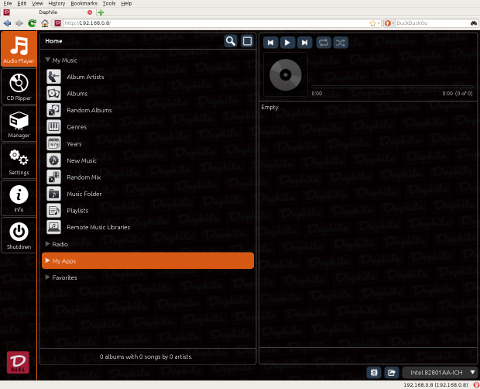
- Web-Based Interface: Intuitive control via any web browser.
- Network Compatibility: Support for SMB, NFS, UPnP, and other network protocols.
- Resampling Engine: High-quality sample-rate conversion integrated as an option.
How Daphile Works
System Architecture
Daphile’s architecture is divided into several key layers:
- Linux Kernel: Customized to prioritize audio threads and minimize unnecessary processes.
- Audio Stack: ALSA (Advanced Linux Sound Architecture) forms the foundation for hardware communication.
- Audio Engine: Uses Squeezelite for playback, ensuring compatibility with Logitech Media Server.
- Web Server: A lightweight HTTP server hosts the entire user interface for remote control.
- System Services: Manage network shares, file indexing, and metadata retrieval.
Installation and Initialization
Installing Daphile typically involves the following steps:
- Download the ISO image from the official website or mirror.
- Create a bootable USB drive or burn a CD/DVD.
- Boot the target machine using the installation media.
- Select the installation destination (internal drive or external USB disk).
- Follow the on-screen prompts to complete the setup.
Upon first boot, Daphile performs an initial hardware scan, configures network settings, and indexes available audio files. After this process, the system becomes accessible via its web interface.
Playback Engine
The heart of Daphile’s playback is the Squeezelite client, which communicates with Logitech Media Server. This allows Daphile to:
- Receive audio streams without local decoding overhead.
- Support gapless playback for uninterrupted listening.
- Offer precise volume control without compromising audio resolution.
Additionally, Daphile integrates SoX Resampler for high-quality sample-rate conversion. Users can choose to resample all tracks to a single output rate or let bit-perfect playback occur when source and output rates match.
Orientation and Target Audience
Daphile is oriented primarily toward:
- Audiophiles: Individuals who seek the highest fidelity in digital music playback.
- Home Audio Enthusiasts: Users building dedicated music servers or multi-room audio setups.
- Professional Environments: Studios or public spaces that require stable, high-quality audio distribution.
- Minimalists: Those who prefer a lean, purpose-built system over feature-bloated alternatives.
The system’s focus on headless operation—controlled exclusively via web browser—enables placement in living rooms, server cabinets, or racks without the need for a dedicated monitor or keyboard.
Key Features
- Headless Operation: Remote control through any modern web browser on desktops, tablets, or smartphones.
- Network Sharing: Access libraries via SMB, NFS, FTP, SFTP, and UPnP.
- Web Interface: Dashboard for playback, library management, and system monitoring.
- Bit-Perfect Playback: Ensures that the audio bitstream remains unaltered from storage to output.
- Jitter Reduction: FIFO buffering and optimized kernel scheduling to reduce timing errors.
- Multiple Outputs: Support for USB DACs, FireWire, S/PDIF, HDMI, and PCI sound cards.
- Automatic Updates: Firmware and software upgrades delivered via the web interface.
- Plugin Ecosystem: Extend functionality with additional codecs, streaming services, or metadata sources.
System Requirements
| Component | Minimum | Recommended |
|---|---|---|
| CPU | 1 GHz single-core | Dual-core 2 GHz or higher |
| RAM | 512 MB | 2 GB or more |
| Storage | 4 GB SSD or USB | 8 GB SSD or larger |
| Network | 100 Mbps Ethernet or Wi-Fi | 1 Gbps Ethernet |
| Audio Output | Any ALSA-supported device | Dedicated USB DAC or PCI sound card |
Installation and Setup Guide
Step 1: Preparing Installation Media
- Download the latest Daphile ISO.
- Use tools like Rufus (Windows) or dd (Linux/macOS) to write the ISO to a USB stick.
- Ensure the USB stick is formatted correctly (FAT32 recommended).
Step 2: Installing Daphile
- Insert the USB installation media into the target machine.
- Power on and enter the BIOS/UEFI menu.
- Set USB as the first boot device and save changes.
- Follow the on-screen installer prompts to select the target drive.
- Wait for the installation to complete, then reboot.
Step 3: Initial Configuration
- Open a browser on another device and navigate to the IP address displayed on Daphile’s boot screen.
- Log in with the default credentials (username: daphile, password: daphile).
- Configure network shares and point Daphile to your audio libraries.
- Select your preferred audio output device and sample rate settings.
Usage and Configuration
Library Management
The web interface provides tools to scan and index your music collection. Supported formats include FLAC, WAV, ALAC, MP3, AAC, OGG, and more. Metadata is automatically imported from file tags and online databases.
Playback Control
Playback can be managed through:
- The built-in web UI dashboard.
- Third-party Logitech Media Server apps.
- UPnP/DLNA control points on smartphones and tablets.
Audio Settings
Advanced users can tweak:
- Buffer Sizes: Adjust to fine-tune latency vs. jitter performance.
- Resampling Options: Enable SoX resampling or bypass for bit-perfect output.
- Sample Rate Conversion: Choose target rates (44.1 kHz, 48 kHz, etc.) for uniform processing.
Curiosities and Lesser-Known Facts
- Open Source Roots: Although Daphile itself is not fully open source, it incorporates many open-source components, including the Linux kernel, ALSA, and SoX.
- Headless by Design: Early versions of Daphile included a local GUI. This was removed to lower system overhead and reduce potential interference with audio processes.
- Live Mode: You can try Daphile without installing it by running entirely from the USB stick, though performance may vary.
- ARM Port: Enthusiasts have successfully ported Daphile to certain ARM boards, though official support remains x86/x64 only.
- Plugin Ecosystem: Community-contributed plugins exist for TIDAL, Qobuz, and other streaming services, though these require third-party servers.
- Minimal Footprint: The entire installed system typically consumes under 2 GB of disk space, leaving ample room for logs, cache, and swap.
Conclusion
Daphile stands out as a highly specialized solution for audiophiles who demand simplicity, reliability, and top-tier audio fidelity. Its headless design, streamlined kernel, and robust web interface make it an ideal choice for both hobbyists and professionals seeking a dedicated music server. By focusing exclusively on audio playback, Daphile minimizes distractions and potential performance bottlenecks, ensuring that your digital music library is rendered with the utmost precision.
Whether you are building a multi-zone home audio system or simply want a standalone audio player for your USB DAC, Daphile provides a comprehensive package that is easy to install, configure, and maintain. Its combination of open-source technologies and proprietary optimizations creates a unique platform that continues to evolve thanks to an active community of users and developers.
Leave a Reply