Introduction
OpenMediaVault is a specialized Linux distribution designed to transform standard hardware into a fully-fledged Network-Attached Storage (NAS) solution. Leveraging the stability of Debian and an intuitive web interface, it empowers users—from home enthusiasts to small businesses—to store, manage, and share digital content efficiently. This article delves into what OpenMediaVault is, how it works, its primary orientation, and some fascinating curiosities surrounding this open-source project.
What is OpenMediaVault?
History and Origins
Launched in 2009 by Volker Theile, OpenMediaVault (OMV) emerged as a successor to the original FreeNAS fork for Linux. Theile’s goal was to create an easily maintainable, Debian-based NAS platform. Over the years, the project has grown through community contributions, evolving into one of the most popular NAS systems in the open-source ecosystem.
Main Features
- Web-Based Management: A responsive, user-friendly interface accessible via any modern browser.
- Modular Architecture: Core system plus plugins for extended functionality.
- Multiple File Systems: Support for ext4, XFS, Btrfs, ZFS (via plugin), and more.
- Comprehensive Protocol Support: SMB/CIFS, NFS, FTP, TFTP, rsync, SFTP, AFP, and iSCSI.
- RAID Management: Software RAID levels 0, 1, 5, 6, 10, and JBOD using mdadm.
- Monitoring and Notifications: System health checks, SMART support, SNMP, email alerts.
- Security: SSH, HTTPS, user and group management, firewall integration.
How OpenMediaVault Works
Underlying Architecture
At its core, OMV is built upon Debian Linux. It uses Debian’s robust package management (APT) and stable kernel as a foundation. On top of this, OMV introduces a customized Debian meta-package that preconfigures system settings, networking, and services optimized for NAS operations.
Plugins and Extensibility
One of OMV’s greatest strengths is its plugin framework. Plugins are distributed as Debian packages, making installation straightforward. Popular plugins include:
- openmediavault-omvextrasorg (third-party plugin repository)
- openmediavault-zfs (ZFS support)
- openmediavault-docker-gui (Docker management UI)
- openmediavault-nextcloud (Nextcloud integration)
- openmediavault-afp (Apple Filing Protocol)

Web-based Management Interface
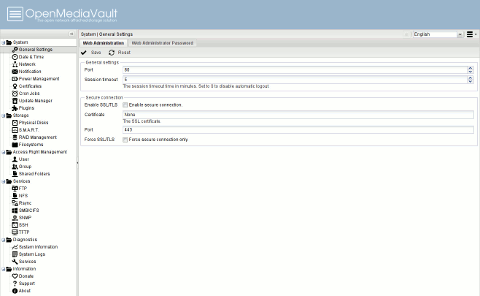
The entire system is administered via a web interface, eliminating the need for a desktop environment. The GUI is divided into logical sections:
- System: Network settings, updates, certificates.
- Storage: Disks, RAID, file systems, shared folders.
- Access Rights Management: Users, groups, shared folder permissions.
- Services: Enabling and configuring protocols like SMB/CIFS, FTP, NFS.
- Diagnostics: Logs, resource monitoring, SMART data.
Supported Services and Protocols
OMV supports a wide array of network protocols and services to cater to diverse environments:
| Protocol/Service | Description |
|---|---|
| SMB/CIFS | Windows file sharing, detailed ACL support |
| NFS | Linux/Unix network file system |
| FTP/FTPS | Standard and secure file transfer |
| SFTP | Secure file transfer over SSH |
| rsync | Efficient synchronization and backup |
| iSCSI | Block-level storage for virtualization |
| TFTP | Simple network booting of devices |
| AFP | Apple Filing Protocol for older macOS |
Orientation and Use Cases
Home Users
For home enthusiasts, OpenMediaVault offers a cost-effective way to centralize media, backups, and personal file storage. Typical scenarios:
- Media streaming via Plex or Jellyfin.
- Automated backups of personal computers.
- Surveillance camera recording storage.
- Home office file sharing.
Small and Medium Businesses
SMBs benefit from OMV’s enterprise-grade features without licensing fees:
- Shared document repositories via SMB/CIFS or NFS.
- Virtualization storage backends using iSCSI.
- Centralized backup solutions with rsync or SnapRAID.
- Secure remote access through VPN and dynamic DNS plugins.
Educational and Research Environments
Colleges, schools, and labs leverage OMV for:
- Storing large datasets (genomic sequences, simulations).
- File distribution for students via FTP or HTTP.
- Project collaboration with Nextcloud integration.
- Network booting for computer labs via TFTP.
Installation and Initial Setup
System Requirements
| Component | Minimum | Recommended |
|---|---|---|
| CPU | 1 GHz 64-bit | 2 GHz multi-core |
| RAM | 1 GB | 4 GB |
| Storage (OS) | 8 GB SSD/Flash | 16 GB SSD |
| Hard Drives | As required | Multiple HDDs/SSDs |
| Network | 1 Gbps | 1 Gbps or 10 Gbps |
Installation Steps
Downloading the ISO
Obtain the latest OMV ISO from the official website. Verify checksums to ensure integrity.
Preparing the Installation Media
Create a bootable USB using tools like Rufus (Windows) or dd (Linux/macOS).
Configuring the BIOS/UEFI
boot from USB, set boot mode to UEFI or Legacy depending on hardware.
Post-Installation Configuration
- Assign a static IP or configure DHCP reservation.
- Log into the web interface at https://your-server-ip/: default credentials are admin/openmediavault.
- Update the system and change the admin password.
- Configure storage devices, volumes, and shared folders.
Administration and Maintenance
Monitoring and Reporting
OMV provides built-in monitoring tools including:
- Real-time resource utilization graphs.
- SMART disk health status.
- System logs and audit trails.
- SNMP integration for external monitoring.
Backup and Recovery
Implement a multi-tier backup strategy:
- On-site backups using rsync or USB drives.
- Off-site replication via rsync or cloud sync plugins.
- Snapshots with Btrfs or ZFS for point-in-time recovery.
Security Best Practices
- Enable HTTPS and obtain certificates via Let’s Encrypt.
- Harden SSH: change default port, use key-based authentication.
- Regularly apply security updates.
- Restrict plugin installations to trusted sources.
Advanced Features and Plugins
Docker
The Docker plugin adds a lightweight containerization framework. Users can deploy apps like Home Assistant, Bitwarden, or Nextcloud without modifying the host system.
Virtualization (KVM)
A KVM plugin enables hosting virtual machines directly on the NAS. Ideal for running additional services or lab environments.
Dynamic DNS and Remote Access
Dynamic DNS plugins ensure remote access remains consistent even with changing IP addresses. Combined with VPN services, this facilitates secure remote administration.
Media Streaming and Plex/Jellyfin
Install the Plex or Jellyfin plugin to transform OMV into a powerful media server. Features include transcoding, metadata fetching, and client support on multiple platforms.
Performance Considerations
Hardware Recommendations
- Use SSDs for the OS and hot data pools.
- High-capacity HDDs for bulk storage.
- ECC RAM for data integrity in enterprise setups.
- Dedicated gigabit or 10GbE NICs for network throughput.
Network Configuration
Optimize your network by:
- Enabling jumbo frames (MTU 9000) where supported.
- Configuring link aggregation (LACP) for higher bandwidth.
- Segmenting traffic via VLANs for security and QoS.
File System Choices
| File System | Pros | Cons |
|---|---|---|
| ext4 | Stable, fast, wide support | Limited snapshots, no checksums |
| XFS | High performance on large files | Slow repair, no built-in checksums |
| Btrfs | Snapshots, checksums, RAID | Complex, still maturing |
| ZFS | Data integrity, compression, deduplication | High memory usage, licensing concerns |
Community and Support
Official Resources
Community Forums and Plugins
Active community members contribute plugins, tutorials, and troubleshooting tips. Popular third-party repositories extend functionality beyond the core system.
Professional Support Options
Companies and consultants offer paid support, custom plugin development, and turn-key NAS appliance services based on OMV.
Curiosities and Interesting Facts
Trivia
- OMV’s original name was NAS4Linux before rebranding.
- The project follows a strict Debian policy, ensuring compatibility and security.
- Over 1 million downloads since inception.
Comparison with Other NAS Solutions
| Feature | OpenMediaVault | FreeNAS/TrueNAS | Unraid |
|---|---|---|---|
| Base OS | Debian Linux | FreeBSD | Slackware-based |
| File System | ext4, XFS, Btrfs, ZFS | ZFS | XFS, Btrfs |
| Plugins | Debian-based APK | jails/plugins | Docker/VM templates |
| Cost | Free/Open Source | Free/Open Core | Paid license |
Famous Deployments
While OMV is primarily used in small-scale environments, notable cases include:
- University research groups storing petabytes of genomic data.
- Community centers providing digital archives and backups.
- Home media servers serving hundreds of active users simultaneously.
Conclusion
OpenMediaVault stands out as a versatile, community-driven NAS platform suitable for a wide range of scenarios. Its Debian foundation, modular plugin architecture, and comprehensive protocol support make it an ideal choice for home users, SMBs, and educational institutions alike. Whether you need a simple file share, a media streaming server, or a robust backup solution, OMV provides the tools and flexibility to build a reliable storage infrastructure.
Sources
- https://www.openmediavault.org
- https://wiki.openmediavault.org
- https://forum.openmediavault.org
- https://en.wikipedia.org/wiki/OpenMediaVault
Leave a Reply