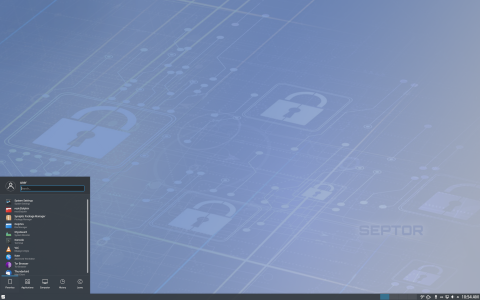
Introduction to Septor
Septor is a privacy-focused Linux distribution designed to facilitate anonymous internet usage without compromising usability. Built on top of Debian’s stable branches, Septor seamlessly integrates Tor network connectivity, pre-configured applications for secure communication, and system-level hardening. This article dives into what Septor is, how it works, its primary orientations, and several curiosities that make it stand out among other privacy-focused operating systems.
What Is Septor?
Septor is a Live Operating System (OS) which can be booted from a USB stick or DVD without any installation on the host computer. It routes all network traffic through the Tor anonymity network, thereby ensuring that no direct connections to the internet are possible.
Origin and Development
- Initial Release: The first public version of Septor was released in 2016.
- Base Distribution: Debian Stable, chosen for its reliability and vast package repository.
- Main Maintainer: Developed and maintained by an open-source community primarily coordinated via SourceForge and GitHub.
- Update Mechanism: Regular point releases align with Debian Stable security updates.
Core Objectives
- Ensure complete anonymity by default.
- Provide an out-of-the-box experience for privacy-oriented users.
- Offer a lightweight environment suitable for older hardware.
- Leverage free and open-source software to maximize transparency.
How Septor Works
Septor’s architecture combines several layers of privacy guarantees, ensuring that users remain anonymous at system, network, and application levels.
System Architecture
- Kernel: Linux kernel 5.x series with additional patches for security hardening.
- Userland: XFCE desktop environment for a user-friendly yet lightweight experience.
- Package Manager: APT, inherited from Debian, enabling easy installation and updates.
Tor Integration
Every application in Septor is forced to use the Tor SocksPort or TransPort by default. The firewall rules (using iptables) block any direct connection to the clearnet, ensuring leaks are virtually impossible.
- Automatic Tor startup at boot time.
- Transparent proxying of all TCP connections through Tor.
- DNS requests are resolved via Tor’s DNSPort, preventing DNS leaks.
System Components
| Component | Description | Purpose |
|---|---|---|
| Tor Browser | Modified Mozilla Firefox | Anonymous web browsing |
| OnionShare | CLI and GUI tool | Share files securely over Tor |
| Electrum | Bitcoin Wallet | Secure cryptocurrency transactions |
| HexChat | IRC Client | Anonymous chat via Tor network |
| SimpleScreenRecorder | Screen capturing tool | Document processes securely |
Septor’s Orientation
The primary orientation of Septor revolves around anonymity, privacy, and secure communications. It targets individuals who require confidentiality in their digital activities, such as journalists, researchers, whistleblowers, and privacy enthusiasts.
Target Audience
- Journalists and Activists: Seek to protect sources and communications from surveillance.
- Researchers: Require untraceable browsing to gather sensitive data.
- Whistleblowers: Need a secure channel to share information without fear of identification.
- Privacy Enthusiasts: Users who value online anonymity and resist tracking.
Primary Use Cases
- Accessing censored or geo-restricted content without leaving digital footprints.
- Secure file sharing and communications in oppressive regimes.
- Cryptocurrency transactions with minimized risk of interception.
- Research on sensitive topics without being profiled or tracked.
System Requirements and Installation
Septor is designed to be lightweight and runs efficiently on relatively modest hardware.
Minimum Requirements
- CPU: 1 GHz dual-core processor
- RAM: 2 GB
- Storage: 8 GB USB stick or DVD
- Graphics: Any GPU supporting 1024×768 resolution
Recommended Requirements
- CPU: 2 GHz dual-core or faster
- RAM: 4 GB or more
- Storage: 16 GB USB 3.0 stick
- Graphics: GPU with hardware acceleration support
Installation Modes
- Live Mode: Boot from removable media without affecting the host system.
- Full Installation: Install on a dedicated disk partition for persistent storage and updates.
- Persistent Storage: Optional feature on Live USB to save settings across reboots.
Curiosities and Interesting Facts
Septor contains several lesser-known features and design choices that enhance its appeal to privacy-minded users.
Built-In Anti-Forensic Measures
- RAM is wiped at shutdown to remove traces of sessions.
- Clipboard manager is disabled by default to prevent data remnants.
- Logs are either minimized or written only to volatile memory.
Onion Services
Septor’s developers maintain a hidden .onion site to distribute ISO images and documentation over Tor. This ensures users in heavily censored regions can access downloads without revealing their IP address.
Comparison with Other Privacy Distros
Feature Comparison Table
| Feature | Septor | Tails | Whonix |
|---|---|---|---|
| Base System | Debian Stable | Debian Testing | Debian Stable (two VMs) |
| Live Persistence | Yes (optional) | Yes | No |
| Default Desktop | XFCE | GNOME | KDE or XFCE |
| OnionShare Included | Yes | No (manual install) | No |
| Crypto Wallet | Electrum | None | None |
Community and Support
- Active discussion forums on SourceForge.
- GitHub repositories for bug reports and feature requests.
- Documentation available in multiple languages, maintained by volunteers.
- IRC channels for real-time assistance via Tor network.
Development Roadmap
The Septor team follows a roughly six-month release cycle aligned with Debian’s stable updates. Upcoming plans include:
- Refining the UI for better accessibility.
- Adding additional privacy tools such as Ricochet and Session messaging clients.
- Improving hardware support, especially for Wi-Fi chipsets.
- Integrating containerization (e.g., Docker) for isolating legacy applications.
Conclusion
Septor is a compelling choice for anyone who requires a privacy-centric operating system that is both easy to use and robust. With its strong emphasis on Tor integration, system hardening, and a carefully curated suite of tools, it serves as a versatile platform for secure communications, anonymous browsing, and sensitive research. Whether booted in live mode or installed for persistent use, Septor offers a trusted environment for users who demand maximum anonymity without sacrificing performance or convenience.
For more information and to download Septor, visit its official page on SourceForge: https://sourceforge.net/projects/septor/
Leave a Reply