YunoHost: Self-Hosting Made Simple
YunoHost is an open-source server operating system which aims to simplify the deployment and administration of a server for personal or small community use. By combining a Debian base with simplified administration tools, it empowers users to host web applications, manage domains, and secure services without requiring deep technical expertise. This article explores what YunoHost is, how it works, its intended audience, core features, and some curious facts.
Table of Contents
- Overview
- Architecture and Components
- Installation Process
- Administration and Management
- Typical Use Cases
- Key Features
- Security and Updates
- Community and Support
- Curiosities and Trivia
- Additional Resources
1. Overview
YunoHost is built on top of Debian GNU/Linux, offering a ready-to-use distribution with preconfigured services. It abstracts away the complexity of system administration by providing an intuitive web interface and a powerful command-line tool.
- Origin: Started in 2013 as a project to democratize server hosting.
- Goal: Allow individuals and small communities to self-host services like blogs, file sharing, chat, and more.
- License: Primarily distributed under the GNU General Public License v3.0.
2. Architecture and Components
YunoHost relies on standard Debian components, enhanced by custom scripts and integrations:
2.1 Debian Base
- Core system: Debian Stable provides the foundation, ensuring security and stability.
- Package management: apt and dpkg handle software installation and upgrades.
2.2 Custom Management Tools
- yunohost-admin: A command-line utility for advanced operations.
- Web Admin Interface: A responsive web dashboard for day-to-day management.
- One-Click Install Scripts: Automated scripts to deploy applications with minimal configuration.
2.3 Networking and DNS
YunoHost manages DNS records and offers Dynamic DNS support:
- Manual DNS: Users can specify custom DNS A/AAAA records.
- Dynamic DNS: Integration with providers like DuckDNS or No-IP to handle changing IP addresses.
- SSL/TLS: Automatic Let’s Encrypt certificates for secure HTTPS connections.
2.4 Package Repository
A dedicated repository hosts packaged applications, maintaining compatibility and smooth upgrades:

- Official YunoHost packages
- Community-contributed apps
- Automated CI/CD to test and release new versions
3. Installation Process
The installation of YunoHost can be performed in several ways depending on hardware and user preference:
3.1 Standalone ISO
- Download: Grab the official ISO from the website.
- Boot: Create a USB key and boot your machine.
- Install: Follow the guided installer which partitions the disk, installs Debian and YunoHost components.
3.2 Docker Container
- Prerequisite: Docker Engine installed on host OS.
- Pull Image: docker pull yunohost/yunohost.
- Run: docker run with necessary volumes and network settings.
3.4 Manual on Debian
- Use case: When adding YunoHost to an existing Debian server.
- Steps:
- Add YunoHost APT repository.
- apt-get update ampamp apt-get install yunohost.
- Run
yunohost tools postinstallto finalize setup.
4. Administration and Management
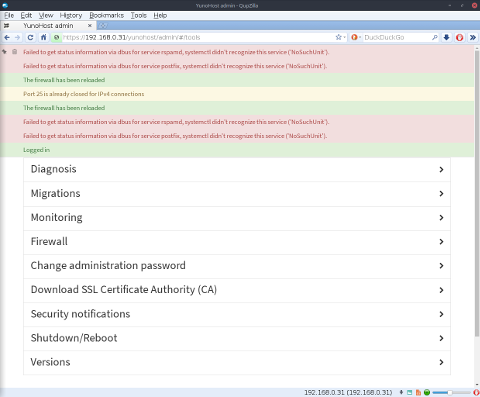
Once installed, YunoHost offers tools to configure domains, install applications, manage users, and monitor system health.
4.1 Web Admin Interface
- Dashboard: Overview of system load, storage, memory usage.
- Domains: Add or remove domains and subdomains.
- Applications: Install, update, or remove apps from a catalog.
- Users: Create user accounts with mailboxes and access rights.
- Logs: Centralized logging interface.
4.2 Command-Line Utility
yunohost domain add– Add a new domain.yunohost app install– Install an app via CLI.yunohost user create– Add a new user.yunohost backup create– Generate a backup snapshot.
5. Typical Use Cases
YunoHost caters primarily to these audiences:
- Individuals: Self-host personal blogs, cloud storage, and chat services.
- Families: Share calendars, photos, and private messaging within a household.
- Small Community Groups: Provide collaboration tools, forums, and wikis.
- Educational Institutions: Host e-learning platforms, Moodle, Nextcloud, or Etherpad instances.
- Associations and NGOs: Maintain control over sensitive data and communications.
6. Key Features
YunoHost brings together numerous features to create a turnkey self-hosting experience.
6.1 Application Catalog
| Category | Example Apps | Description |
|---|---|---|
| Blog amp CMS | WordPress, Ghost | Publish content with ease. |
| File Sharing | Nextcloud, Seafile | Synchronize and share files securely. |
| Communication | Matrix, Rocket.Chat | Real-time chat and collaboration. |
| Productivity | Jitsi Meet, Etherpad | Video conferencing and collaborative editing. |
| Utilities | Mailman, OpenVPN | Mailing lists, VPN services. |
6.2 Domain and SSL Management
- Manage multiple domains from a single interface.
- Automated issuance and renewal of Let’s Encrypt certificates.
- Optional support for custom certificates.
6.3 Backup and Restore
- Scheduled backups of databases, files, and configurations.
- Supports local storage and remote services (SSH, FTP, WebDAV).
- Incremental backup to optimize space.
6.4 Monitoring and Alerts
- Visual reporting of system metrics (CPU, RAM, disk I/O).
- Email alerts when critical services fail or thresholds are exceeded.
7. Security and Updates
Security is a primary concern in YunoHost’s design:
- Automatic Security Patches: Debian security updates are applied regularly.
- App Sandboxing: Each application runs under its own system user.
- Two-Factor Authentication: Optional for admin and user accounts.
- Firewall Configuration: UFW-based firewall with default-deny for unused ports.
- Fail2Ban Integration: Protect SSH, web login pages against brute-force attempts.
8. Community and Support
YunoHost benefits from a vibrant community:
- Forums: Community-driven support on discuss.yunohost.org.
- Matrix Room: Real-time chat with developers and users.
- Documentation: Official guides at https://yunohost.org.
- Contributing: Open GitLab repository under https://gitlab.com/YunoHost.
- Translations: Community-driven localization for many languages.
9. Curiosities and Trivia
9.1 Name Origin
The name “YunoHost” is derived from “Your Ubuntu (or Debian) Host,” although it now targets Debian by design.
9.2 Humble Beginnings
- Started in a French apartment by a small group of enthusiasts.
- Aimed initially at non-technical users seeking an easy mail server setup.
9.3 App Packaging Philosophy
Instead of forcing upstream packages, YunoHost uses meta-packages and one-click scripts to apply best practices during installation (e.g., setting proper file permissions, creating service users).
9.4 Use in Education
Several schools and universities have adopted YunoHost to teach students about Linux administration and self-hosting, thanks to its transparent tooling.
9.5 Offline Installation Kits
For areas with limited connectivity, community members have created offline installers that bundle app packages for local deployment without internet access.
10. Additional Resources
- Official Website: https://yunohost.org
- GitLab Repository: https://gitlab.com/YunoHost
- Community Forum: https://forum.yunohost.org
- Documentation: https://yunohost.org/#/documentation
- Docker Image: https://hub.docker.com/r/yunohost/yunohost

Leave a Reply