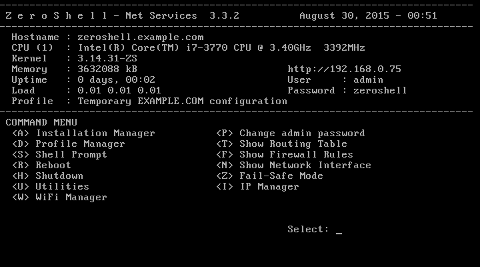
Zeroshell: A Comprehensive Guide
Introduction
Zeroshell is an open-source Linux distribution designed to provide advanced network services through a web-based interface. Originally released in 2004 by Matteo Montagna, it has since gained a reputation for its versatility and ease of deployment in small to medium-sized networks. Whether used as a router, firewall, VPN concentrator, captive portal, or RADIUS server, Zeroshell integrates multiple network functionalities into a single, compact package. This article delves into what Zeroshell is, how it works, its intended orientation, and several curiosities that make it a compelling choice for network administrators.
What Is Zeroshell?
Overview
At its core, Zeroshell is a Live CD or ISO image that can be installed on a variety of hardware platforms. Based on the Linux kernel, it leverages standard open-source tools and custom scripts to deliver a comprehensive suite of network services. Unlike general-purpose Linux distributions, Zeroshell’s focus is squarely on network management, security, and authentication. Its modular architecture allows administrators to enable or disable features on demand, reducing resource consumption and attack surface.
Key Features
- Routing and NAT: Static and dynamic routing (RIP, OSPF), Network Address Translation (NAT) for IPv4/IPv6.
- Firewall: Stateful packet inspection and configurable rule sets.
- VPN Services: Support for IPsec, OpenVPN, L2TP, PPTP.
- Captive Portal and AAA: RADIUS authentication for Wi-Fi and wired access, voucher-based and social-login captive portal.
- Quality of Service (QoS): Traffic shaping, bandwidth management, per-IP or per-service class prioritization.
- Wireless Access Point Controller: Centralized management of multiple access points.
- DNS and DHCP: Integrated DNS forwarder and dynamic host configuration.
- Monitoring and Logging: Real-time graphs, connection statistics, Syslog server.
- High Availability: VRRP (Virtual Router Redundancy Protocol) for failover clustering.
How Zeroshell Works
Architecture
Zeroshell’s architecture is divided into several layers:
- Kernel Layer: Standard Linux kernel (customized patches for network performance).
- Service Layer: Collection of daemons and scripts providing routing, firewall, and VPN.
- Management Layer: Web-based GUI built with Apache, PHP, and custom components.
- Storage Layer: Configuration files and databases stored on persistent media (disk, USB, Compact Flash).
When the system boots, the kernel initializes hardware and networking. Service daemons start in sequence, reading configurations from the web-managed database. Administrators interact via a secure HTTPS interface, making real-time changes without manual config file edits.
Network Services
Routing and NAT
Zeroshell supports both IPv4 and IPv6 routing. Administrators can configure static routes or enable dynamic routing protocols such as RIP and OSPF. NAT can be applied at the interface level, allowing multiple internal hosts to share a public IP address.
Firewall
The built-in firewall uses iptables for packet filtering. The GUI provides a rule editor where rules can be ordered, grouped, and associated with interface zones (LAN, WAN, DMZ). Stateful inspection ensures return traffic is matched correctly.
Captive Portal and RADIUS
One of Zeroshell’s standout features is its captive portal, which intercepts HTTP(S) requests until users authenticate. The AAA engine supports:
- Local user database.
- External RADIUS servers.
- Voucher-based access with expiration and bandwidth quotas.
- Social login (Facebook, Google) through OAuth integrations.
Virtual Private Network (VPN)
VPN connectivity is crucial for secure remote access. Zeroshell supports:
- IPsec with IKEv1/IKEv2 for site-to-site tunneling.
- OpenVPN for SSL-based remote user access.
- L2TP and PPTP as legacy options.
Quality of Service (QoS)
Traffic shaping and bandwidth control are managed via the tc tool. Policies can be applied per-IP, per-protocol, or per-user, ensuring critical applications receive priority over bulk transfers.
Use Cases and Orientation
Target Audience
Zeroshell is oriented toward network administrators, IT consultants, educational institutions, and small-to-medium enterprises (SMEs) that require robust network services without high licensing costs. It is especially popular in:
- Educational campuses offering Wi-Fi with captive portals.
- Cafés and hotels providing voucher-based Internet access.
- Branch offices requiring VPN connectivity to corporate data centers.
- Non-profit organizations with limited budgets.
Ideal Scenarios
- Multi-ISP Failover: Balancing load between two or more Internet connections with automatic failover.
- School Networks: Centralized user management, bandwidth quotas per student.
- Public Access Networks: Guest portals with custom branding and social login.
- Secure Remote Access: VPN concentrator for telecommuting staff.
Comparison with Alternative Solutions
| Feature | Zeroshell | pfSense | OPNsense |
|---|---|---|---|
| License | GPLv2 | BSD | BSD |
| Web Interface | Yes (HTTPS, PHP-based) | Yes (PHP) | Yes (PHP) |
| CAPTIVE PORTAL | Advanced (vouchers, social) | Basic | Basic |
| VPN Options | IPsec, OpenVPN, L2TP, PPTP | IPsec, OpenVPN, WireGuard | IPsec, OpenVPN, WireGuard |
| QoS | Yes (tc-based) | Yes (ALTQ) | Yes (Traffic Shaper) |
| High Availability | VRRP | CARP | CARP |
Installation and Configuration
Hardware Requirements
- CPU: x86 or x86_64 processor (i586 or higher).
- Memory: Minimum 512 MB RAM (1 GB recommended for heavy load).
- Storage: 2 GB disk or Compact Flash.
- Network Interfaces: At least two NICs (LAN and WAN).
Installation Steps
- Download the latest ISO from the official site or SourceForge.
- Create a bootable USB or burn a CD.
- Boot the target machine and select “Install” in the boot menu.
- Partition the disk (automatic or manual).
- Configure initial network interfaces.
- Set the root password and admin user.
- Reboot and access the web interface at https://LAN_IP.
Basic Configuration
Upon first login, the Setup Wizard guides administrators through:
- WAN configuration (DHCP or static IP).
- LAN subnet definition.
- DNS servers and gateway settings.
- Time zone and NTP servers.
- Initial firewall policy (allow/deny by default).
After the wizard, all services can be fine-tuned from the modular menu on the left-hand side of the GUI.
Curiosities and Fun Facts
Embedded Modes
Zeroshell can run on embedded systems such as PC Engines APU boards, turning compact appliances into full-featured routers. This low-power deployment is ideal for remote sites and small offices.
Development and Community
Although the primary developer paused active development in the late 2010s, community-driven forks and patches keep Zeroshell alive. Enthusiasts share custom modules, such as advanced DPI (Deep Packet Inspection) plugins and integration with cloud-based analytics.
Live CD with Persistent Storage
By mounting a USB stick as /var, administrators can run Zeroshell in Live CD mode while preserving configuration changes and logs across reboots, making it a portable network appliance.
Scriptable Hooks
Custom shell scripts can be executed at different stages of service initialization (pre-firewall, post-VPN, on-login, on-logout), offering fine-grained automation for complex environments.
Performance Tuning
For wire-speed routing and firewalling, Zeroshell allows the inclusion of kernel-level patches like nt_redir or hw_nat, enabling hardware acceleration on supported network cards.
Conclusion
Zeroshell stands out as an all-in-one network distribution that balances simplicity with powerful features. Its web-based interface, combined with support for routing, firewall, VPN, captive portal, and QoS, makes it an attractive option for network professionals on a budget. Despite a slowing official development pace, the active community and modular design ensure Zeroshell remains relevant in today’s dynamic networking landscape.
Leave a Reply